
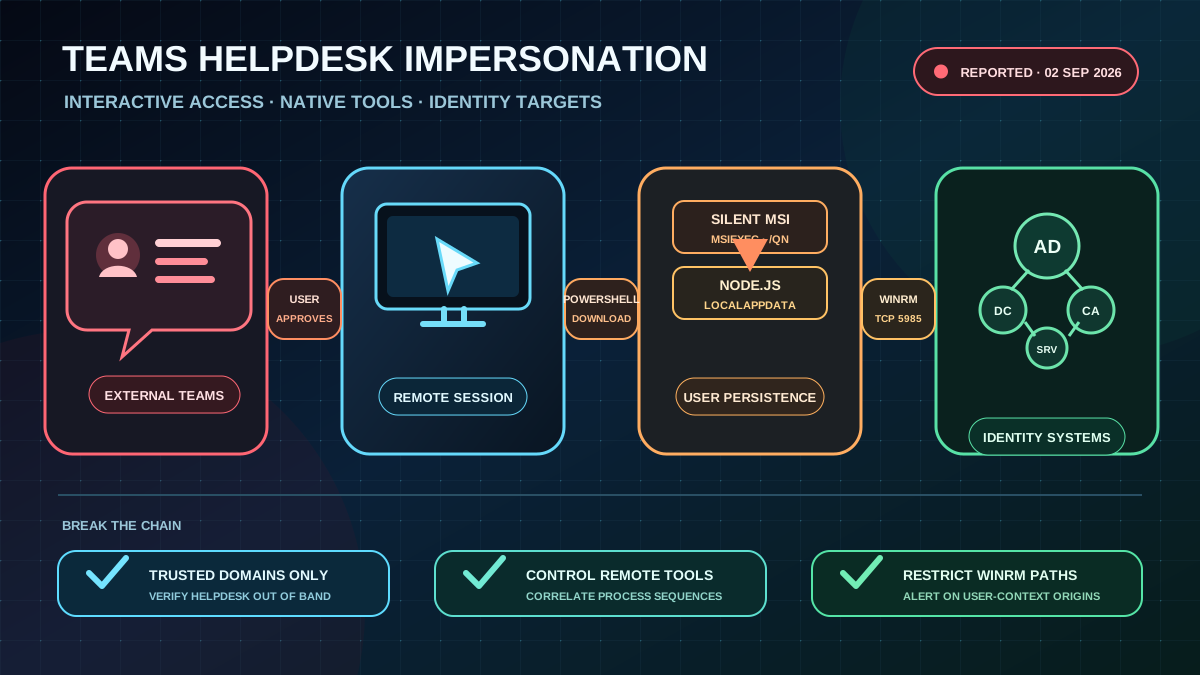
External Teams contact replaces the phishing email
Microsoft Threat Intelligence reported an active, human-operated intrusion campaign over Microsoft Teams on September 2, 2026. Threat actors contact employees from an external tenant, pose as internal IT support and pressure them into starting an interactive remote-support session. The observed paths include granting control during a Teams screen share, opening Quick Assist or using another remote monitoring and management tool.
The attack does not exploit a vulnerability in Teams. It relies on a user overriding the external-contact label and other warnings. Pretexts such as a security update, account verification or imminent account deactivation create urgency. In some cases, a voice call supplements the chat so critical instructions are absent from the message history.
Signed tools carry the attack chain
After remote access is granted, the operator uses PowerShell to download a malicious MSI package from cloud storage and installs it silently with Windows Installer. The package places a portable, legitimate Node.js runtime and an obfuscated JavaScript implant under LocalAppData. PowerShell, cmd.exe, WScript and later rundll32.exe carry out further execution steps.
The variants analyzed by Microsoft established persistence in the user context, either through a Run value under HKEY_CURRENT_USER or a shortcut in the Startup folder. Both used the name EdgeUpdate as a disguise. The implant receives tasks over HTTPS, runs host and security discovery, and repeatedly captures screenshots.
Active Directory reconnaissance follows. Native commands and ADSI queries collect domain accounts, user description fields and Windows servers. The operator probes reachable systems and initiates WinRM connections over TCP 5985. Observed targets include domain controllers and Active Directory certificate authorities. This turns a compromised user workstation into a starting point for access attempts against identity infrastructure and other critical servers.
Detection must connect the sequence
Individual components can be legitimate in normal operations. Their timing and combination provide the stronger signal:
- An external Teams chat or call claims to be an IT or helpdesk contact.
- PowerShell or
cmd.exestarts from the user's desktop immediately after a remote-support session. - PowerShell writes an MSI to
Downloads,AppDataor a temporary directory, andmsiexecinstalls it silently. node.exeor a renamed Node.js binary starts fromLocalAppDataand processes scripts or files with unusual extensions.- WScript, an
EdgeUpdateRun entry or a Startup shortcut with the same name appears in the user profile. - ADSI or LDAP discovery, screen capture and WinRM connections to many internal systems follow from a user-context process.
Teams, endpoint, identity and network telemetry should be correlated by user, device and time window. Detection based only on unknown binaries is insufficient because the campaign deliberately uses legitimate runtimes and native Windows tools.
Restrict support access and WinRM
Teams External Access should be limited to business-required, trusted domains. Support requests need a known internal verification path, such as an existing ticket and a callback through the official helpdesk number. Users should never grant control in response to an unexpected chat or call.
Quick Assist and RMM tools should be available only where they are operationally required and monitored. For privileged applications, phishing-resistant MFA, managed devices and Conditional Access help limit the value of stolen sessions and credentials. Local administrator rights and reusable privileged credentials on user endpoints increase the potential follow-on impact.
WinRM should be restricted to authorized management systems and administration networks. Connections from user workstations to domain controllers or certificate authorities, and WinRM activity originating from non-administrative processes, should trigger alerts. Attack surface reduction rules and Defender network, web and cloud protection need a controlled rollout and verification that effective blocking is enabled.
If the sequence is detected, isolate the endpoint and preserve the associated Teams, endpoint and identity telemetry. Revoke sessions and rotate every credential accessible from the affected system, including domain administrator accounts if they were used there. Access to domain controllers and certificate authorities, privileged groups, new services, tasks and autostart entries belong in the incident triage.
The immediate check: limit external Teams communication to required domains, require independent verification for remote support, and close WinRM paths from user devices to Tier 0 systems.