
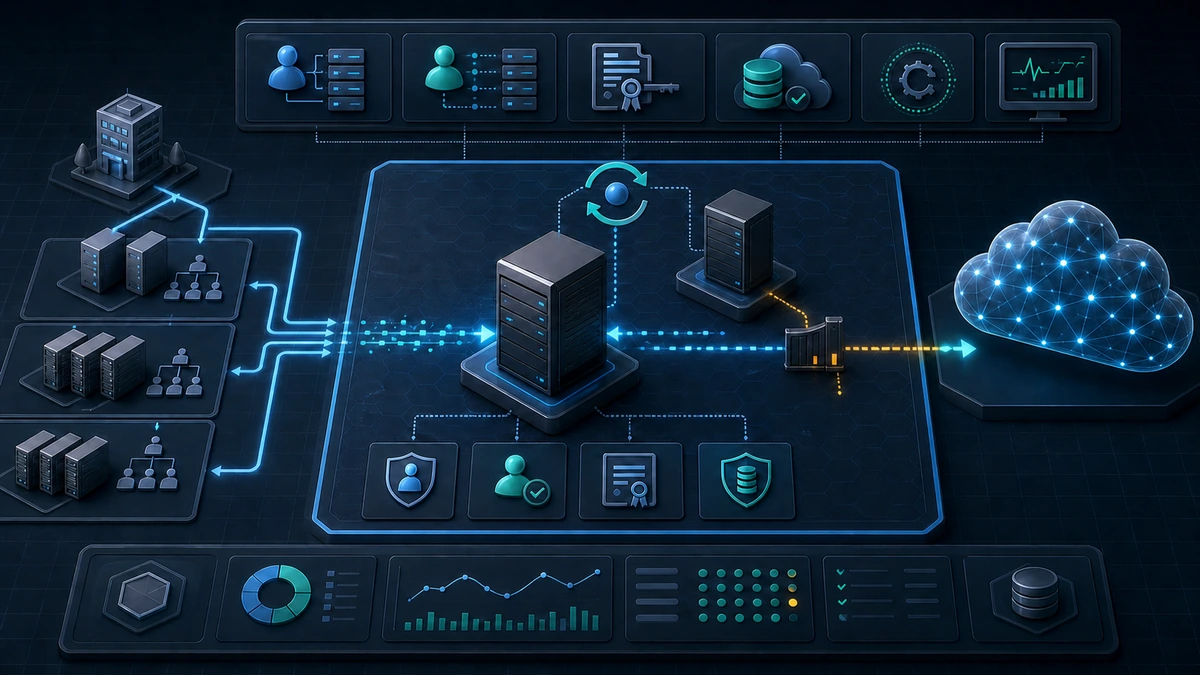
Starting point: one sync server connects two identity planes
Microsoft Entra Connect is easily treated as background infrastructure: one Windows Server, one synchronization service and a run every 30 minutes. In reality, the system sits on one of the environment's most sensitive trust boundaries. It reads identity data from Active Directory, writes objects and attributes to Microsoft Entra ID and, depending on enabled features, can process password hashes, devices, groups or password changes.
Entra Connect uses several identities for those tasks: an AD DS Connector account, the ADSync service account, and a Connector identity in Entra ID or an application identity in current deployments. Their permissions differ substantially. Basic directory synchronization needs less access than Password Hash Synchronization, Password Writeback or other writeback features.
The server stores connector configuration and protected credentials in its synchronization database. Encryption does not remove the risk posed by a local administrator who controls the host, service and database. Anyone administering the Entra Connect server is therefore not working on an ordinary member server, but on the bridge between on-premises and cloud identity.
This is where familiar weaknesses accumulate: installation on a Domain Controller, versions left unpatched for years, permanent local administrators, excessive connector permissions, unreviewed synchronization rules, no export deletion guardrail, and a single server without tested recovery. Each shortcut saves effort briefly and increases compromise or outage risk later.
Target state: the connector belongs to the control plane
A defensible target state is specific:
- Entra Connect runs on a dedicated, supported Windows Server. The host has no unrelated applications, is not a Domain Controller and is not used as a general administration or jump server.
- Administrative access follows the Tier-0 model. Only separate privileged accounts and hardened admin workstations can reach the server; normal user accounts, email and web browsing stay away.
- Every connector permission maps to a feature in active use. Password Hash Sync, Password Writeback, Group Writeback, Device Writeback and Exchange Hybrid permissions are assessed separately.
- The synchronization surface is intentional. Domains, OUs, object types and attributes have owners; privileged and purely technical accounts are not synchronized to the cloud by default.
- Exports have guardrails. Rule and scope changes are reviewed before export, accidental deletion protection remains enabled, and large deletion approvals use four-eyes review.
- A staging server and a current configuration backup exist. Only one server exports actively; the switchover process is documented and tested.
- Operations and changes are visible. Version, sync health, export errors, certificates, administrative actions and local permission changes are monitored.
The goal is not to make the server unmaintainable through maximum control density. The goal is a narrow, explainable operating surface with predictable recovery.
Implementation: harden the host, identities and export path together
1) Record the version and topology first
Before changing anything, establish a reliable inventory: active and staging servers, Windows version, Entra Connect version, SQL model, connected forests, enabled features, authentication method and the most recent successful export.
These read-only queries provide a safe starting point on the sync server:
Import-Module ADSync

Get-ADSyncScheduler |
  Select-Object SyncCycleEnabled, StagingModeEnabled,
    NextSyncCyclePolicyType, NextSyncCycleStartTimeInUTC

Get-ADSyncAutoUpgrade

$uninstallRoots = @(
  'HKLM:\SOFTWARE\Microsoft\Windows\CurrentVersion\Uninstall\*'
  'HKLM:\SOFTWARE\WOW6432Node\Microsoft\Windows\CurrentVersion\Uninstall\*'
)

Get-ItemProperty -Path $uninstallRoots -ErrorAction SilentlyContinue |
  Where-Object DisplayName -Match 'Microsoft (Entra|Azure AD) Connect' |
  Select-Object DisplayName, DisplayVersion, InstallDate
Automatic upgrade is useful, but it is not evidence that the server is current. Failed auto-upgrades must be visible in event logs and in the patch process. A concrete date also matters in July 2026: synchronization services below version 2.5.79.0 are scheduled to stop working after September 30, 2026. That is a minimum, not a target. The target remains the latest supported version that has passed your testing.
For old installations or major operating-system changes, a swing migration is usually cleaner than an in-place upgrade. A new server is built in staging mode so its configuration and expected exports can be compared before cutover.
2) Treat the server as a privileged identity host
Entra Connect belongs on a dedicated, domain-joined Windows Server under current support. Windows Server 2022 or 2025 is the practical baseline for a new deployment. Running it on a Domain Controller or sharing it with AD CS, management tooling, a backup console or third-party applications expands both the attack surface and failure domain.
The host baseline should include at least:
- restrict local administrators to a small, controlled group,
- allow RDP and WinRM only from the Tier-0 admin network or PAWs,
- run Windows Firewall with documented inbound and outbound rules,
- limit internet access to required Microsoft, update, certificate-validation and monitoring endpoints,
- operate EDR and central logging without blanket process or directory exclusions,
- use Secure Boot, BitLocker and a hardened Windows Server baseline,
- deny interactive sign-in for normal users, service accounts and general server administrators,
- audit NTLM first and then reduce it on this host in a controlled rollout,
- treat backups, the VM console and hypervisor access as Tier 0 as well.
Admin sessions use a separate privileged identity. Depending on the operation, Hybrid Identity Administrator is sufficient for the Entra Connect wizard; Global Administrator should not become the permanent operating role. Modern MFA or passwordless sign-in protects the interactive configuration flow, but it does not replace local host security.
3) Permission connector accounts by feature
The three core identities must not collapse into one vaguely privileged account:
- AD DS Connector account: a normal AD user object with the permissions required by the chosen feature set. VSA, MSA and gMSA are not supported for this Connector account.
- ADSync service account: runs the sync service and accesses the SQL database. Its local rights and DPAPI-protected keys belong to the host's protection boundary.
- Entra Connector identity: writes synchronization changes to Entra ID. Current versions support certificate-based application authentication; certificate rotation and the related application must be monitored.
Password Hash Synchronization requires directory replication permissions in AD. Password Writeback and other writeback features need additional write permissions. Do not solve that by storing a broadly privileged account. Decide which features are needed first, then delegate only their documented permissions.
A simple operating query shows the service identity and connector names without printing secrets:
Get-CimInstance Win32_Service -Filter "Name='ADSync'" |
  Select-Object Name, State, StartMode, StartName

Import-Module ADSync
Get-ADSyncConnector |
  Select-Object Name, ConnectorTypeName
The output belongs in protected operating documentation, not a public ticket. After migration, remove retired connector identities only when no active or staging server still uses them.
4) Keep synchronization scope and writeback narrow
OU filtering is not a cosmetic setting. If a synchronized OU is renamed or removed from scope, objects can be treated as no longer synchronized during the next full import and queued for deletion in Entra ID. Scope changes therefore deserve the same care as permission changes.
For every enabled feature, the project record should answer:
- Which objects and attributes are synchronized from which forest?
- Which systems need Password Hash Sync, Password Writeback or another reverse path?
- Which AD OUs contain Tier-0, service, test or technical accounts that do not belong in Entra ID?
- Which default rules were extended and which custom rules exist?
- Who owns
sourceAnchor, UPN and proxyAddress hygiene?
Do not edit Microsoft default rules directly. If a custom rule is required, document it, assign an unambiguous precedence and revalidate it after every upgrade. On-premises and cloud privileged administration should use separate accounts; cloud-only emergency accounts must not depend on the on-premises synchronization bridge.
5) Review changes before export
Never push scope, filter or rule changes straight into a live export. For planned maintenance, stop the scheduler deliberately or build the change on the staging server. Then inspect Connector Space, Metaverse and pending exports.
Import-Module ADSync
Set-ADSyncScheduler -SyncCycleEnabled $false

# Make changes only through supported wizards and tools.
# Review pending adds, updates and deletes before export.

Set-ADSyncScheduler -SyncCycleEnabled $true
Start-ADSyncSyncCycle -PolicyType Delta
Re-enabling belongs after documented approval. Keep accidental deletion protection enabled. The default threshold of 500 objects is often too high for a small tenant and is not automatically right for a very large tenant. Tune it to organization size, normal change volume and response time. Crossing the threshold is a stop signal for investigation, not a reason to disable the guardrail reflexively.
OU renames, forest consolidation, Exchange Hybrid changes and new filters deserve a full-import/full-sync test in staging mode. The review must ask not only whether intended objects appear, but also which objects would unexpectedly be deleted, joined or pushed out of scope.
6) Prepare recovery without two active exporters
A supported resilience pattern uses one active Entra Connect server and at least one staging server. The staging server imports and synchronizes but does not export. Two simultaneously active Connect Sync servers for the same tenant are not a sound active-active design.
Export the configuration through the Entra Connect wizard after every relevant change and store it in a protected location. Automatic JSON exports under %ProgramData%\AADConnect capture wizard changes, but do not necessarily capture every change made through PowerShell, Synchronization Service Manager or Rules Editor. After those changes, perform a deliberate export and compare it with the approved target configuration.
The JSON file is not a complete backup of all credentials and does not replace a recovery test. A proper exercise includes:
- provision a new supported server,
- import the configuration and confirm staging mode,
- re-enter connector credentials through a controlled process,
- compare imports, synchronization and export preview,
- document cutover and fallback decisions,
- retire the old server only after a stable operating period.
Restoring an old VM snapshot is not a reliable recovery model. Host state, DPAPI keys, certificates, database and connector credentials may no longer agree. Especially with application-based authentication and certificate rotation, a reproducible rebuild is safer than an unverified point-in-time image.
7) Monitor operations and administrative change
Monitoring must detect both outage and manipulation. Relevant signals include:
- no successful import, synchronization or export within the expected window,
- an unexpected number of adds, updates or deletes,
- new connector, scope or synchronization rule,
- changes to staging mode, scheduler or authentication method,
- expiry or failed rotation of the Connector certificate,
- new local administrators or interactive sign-ins,
- stopped ADSync service, database failures or proxy errors,
- outdated Entra Connect or Windows version,
- Password Hash Sync or writeback errors.
Current versions log administrative configuration changes as Entra Connect Admin Actions in the Windows Application log. Keep this logging enabled, allocate sufficient log size and forward security-relevant events to the SIEM. Entra Connect Health adds service-side visibility, but it does not replace central Windows logging or an alert for missing synchronization.
Advantages
- Contains a critical transition path: On-premises AD and Entra ID are no longer connected through an arbitrarily administered member server.
- Reduces standing privilege: Connector accounts receive only the rights that active features require.
- Prevents avoidable mass changes: Staging, export preview and deletion thresholds slow down faulty scope and rule changes.
- Improves recoverability: A current staging server and exported target configuration reduce improvised emergency work.
- Makes change auditable: Admin audit events, SIEM forwarding and configuration comparison provide useful evidence.
- Simplifies future modernization: A documented topology can be assessed realistically for Cloud Sync or another hybrid identity model.
Disadvantages and limits
- Tier-0 operations consume resources: A dedicated server, PAW access, staging system and monitoring need owners and maintenance.
- Permissions can become too narrow: Password Writeback, Exchange Hybrid or device features fail if delegations are removed without a feature matrix.
- Network allowlisting needs upkeep: Microsoft endpoints, certificate validation, updates and monitoring paths change over time.
- Staging is not active-active: Switchover remains a controlled operating procedure and must be rehearsed.
- PHS, PTA and federation retain their own risks: Hardening the sync server does not replace the authentication architecture decision.
- Local administrators remain highly powerful: EDR, BitLocker and DPAPI do not neutralize a fully controlled host.
- Cloud Sync is not always a drop-in replacement: Feature, topology and writeback requirements need validation before migration.
Common project pitfalls
- Installing on a Domain Controller: Roles, permissions, patch windows and recovery become unnecessarily coupled.
- Confusing automatic upgrade with patch management: A configured mode does not prove that upgrades succeeded.
- Using Global Administrator permanently: Installation authority becomes the everyday operating identity.
- Overprivileging the Connector account: Writeback or replication permissions survive after the related features are disabled.
- Changing OU filters during live operation: The next full import prepares unexpected cloud deletions.
- Looking at deletion thresholds only during an alert: An unsuitable default does not protect a small or very large tenant automatically.
- Letting two servers export actively: Intended high availability becomes an unsupported operating state.
- Backing up only the JSON file: Credentials, certificates and uncaptured rule changes are missing during recovery.
- Applying broad EDR exclusions: The identity control-plane server loses detection exactly where it matters.
- Forgetting old servers and connector identities: Dormant accounts and applications remain unclear access paths.
- Synchronizing privileged AD accounts by default: On-premises and cloud administration become needlessly coupled.
Project checklist
- [ ] Document active Entra Connect server, staging server, versions, SQL model and connected forests.
- [ ] Check current support and upgrade requirements; move safely beyond minimum version
2.5.79.0before September 30, 2026. - [ ] Operate a dedicated Windows Server as a control-plane/Tier-0 system.
- [ ] Harden local administrators, RDP, WinRM, firewall, EDR, BitLocker, backup and hypervisor access.
- [ ] Use separate privileged admin identities with MFA or passwordless authentication.
- [ ] Inventory AD DS Connector, ADSync service and Entra Connector identities.
- [ ] Review permissions by active feature and remove obsolete delegation through a controlled change.
- [ ] Document domain, OU, object and attribute scope with a business owner.
- [ ] Review privileged, technical and emergency accounts for necessary synchronization.
- [ ] Document custom rules and never edit Microsoft default rules directly.
- [ ] Keep accidental deletion protection enabled and tune its threshold to the tenant.
- [ ] Test scope and rule changes in staging mode with export preview and four-eyes approval.
- [ ] Export the current configuration, protect it and compare it with the approved target.
- [ ] Rehearse staging cutover and clean rebuild at least annually.
- [ ] Send Entra Connect Admin Actions, Sync Health, export failures, certificates and local admin changes to monitoring.
- [ ] Remove retired servers, connector accounts, applications and certificates after migration.