
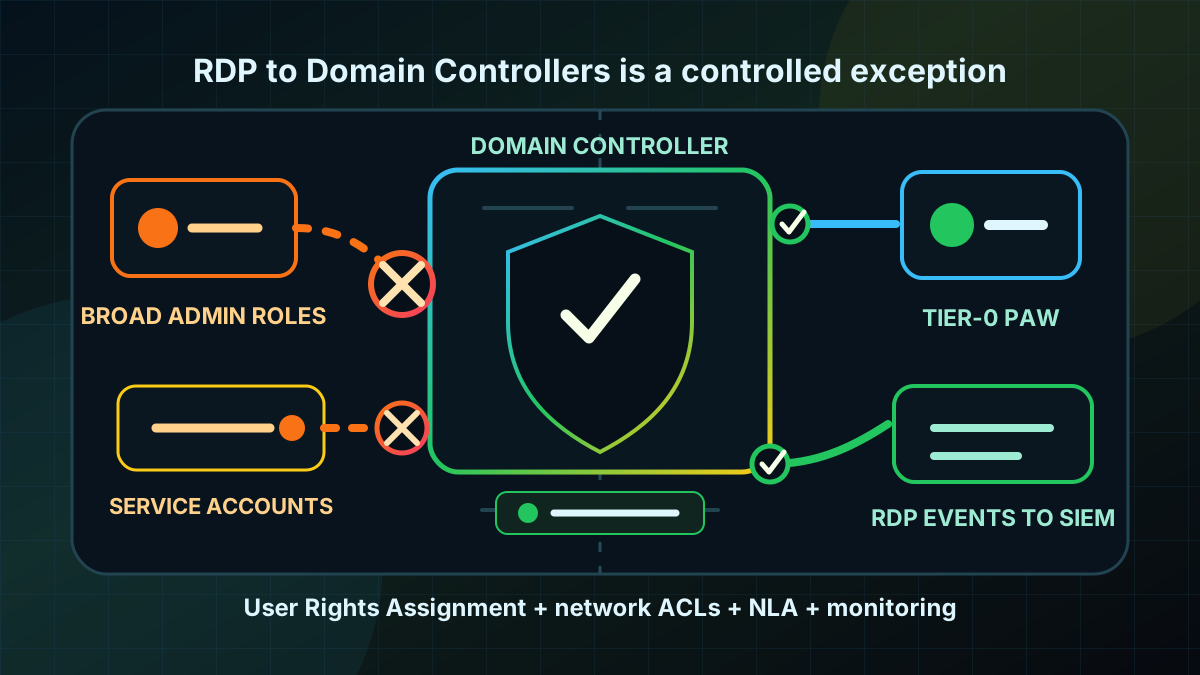
Starting point: RDP to DCs is convenient and risky
Domain Controllers are not normal Windows servers. They handle Kerberos, NTLM, LDAP, Group Policy, DNS integration and the central identity data of the domain. Still, many environments administer them like member servers: RDP is enabled, several admin groups can sign in, firewall rules are broad, and the difference between server administration and Tier-0 administration is blurred in daily operations.
That creates an avoidable risk path. An RDP session on a Domain Controller creates interactive logon traces, profiles, potential credential artefacts and a direct operating path on the most critical Windows system. If helpdesk, server admin, backup or application admin accounts can sign in there, the boundary between normal operations roles and domain control is effectively weakened.
RDP to DCs is not automatically wrong. Certain maintenance, recovery or break-fix scenarios may require an interactive session. The issue is normalization: if DC RDP is the daily admin route, every compromised admin account becomes more valuable, and every poorly hardened admin workstation becomes a Tier-0 risk.
The goal is therefore not simply "disable RDP everywhere". The goal is a controlled operating state: Domain Controllers are primarily administered through secure remote administration and dedicated admin workstations. RDP remains available only for defined Tier-0 scenarios, is technically restricted and is monitored.
Target state: DC RDP is an exception with a clear trace
A solid target state has specific properties:
- Only Tier-0 admins have the RDP logon right. Helpdesk, normal server admins, operator groups and service accounts are excluded.
- RDP is not a substitute for clean remote administration. RSAT, PowerShell Remoting, event forwarding and central management systems use controlled admin paths.
- Network reachability is tightly limited. TCP 3389 on DCs is reachable only from PAW, jump host or management subnets.
- NLA remains mandatory. Remote Desktop is not weakened for old clients or convenience.
- Deny rights are targeted, not broad. No Deny group may accidentally contain Domain Admins or break-glass accounts.
- Every DC RDP session is visible. Successful and failed RemoteInteractive logons are collected and reviewed.
- Emergency access is documented. If RDP is needed for recovery, accounts, locations, approvals and follow-up are defined.
The practical target: a normal admin role cannot operate a DC through RDP. A tightly scoped Tier-0 admin can do so from a controlled network, with traceable sign-in and for a defined purpose.
Implementation: align rights, network and evidence
1) Capture current RDP state
Start read-only. For Domain Controllers, answer these questions:
- Is RDP enabled on DCs or forced by GPO?
- Which GPO sets
Allow log on through Remote Desktop Services? - Which groups have the allowing right?
- Is
Deny log on through Remote Desktop Servicesconfigured and which groups are included? - From which networks is TCP 3389 reachable on DCs?
- Which accounts created Logon Type
10on DCs in the last 30 to 90 days?
A simple event starting point on a DC:
$start = (Get-Date).AddDays(-30)

Get-WinEvent -FilterHashtable @{
  LogName   = 'Security'
  Id        = 4624
  StartTime = $start
} | Where-Object {
  $_.Properties[8].Value -eq 10
} | Select-Object TimeCreated,
  @{Name='TargetUser';Expression={$_.Properties[5].Value}},
  @{Name='SourceAddress';Expression={$_.Properties[18].Value}},
  @{Name='LogonProcess';Expression={$_.Properties[9].Value}}
The property indexes are not the cleanest interface across event versions. For a project, this is a quick start. For sustained monitoring, put the logic into SIEM, Windows Event Forwarding or a robust XML-based event query.
Add failed logons (4625), session reconnects (4778), disconnects (4779) and TerminalServices logs. The important question is not only "who got in", but also "who keeps trying".
2) Do not mix DC RDP with normal server RDP
Domain Controllers need a dedicated GPO or at least a clearly separated GPO section. RDP rules for member servers should not apply to the Domain Controllers OU without review.
The relevant rights are under:
Computer Configuration
  Windows Settings
    Security Settings
      Local Policies
        User Rights Assignment
Especially important:
- Allow log on through Remote Desktop Services
- Deny log on through Remote Desktop Services
- Allow log on locally
- Deny log on locally
For Domain Controllers, the allowing RDP right should be very narrow. A conservative starting point is Administrators if that group is cleanly Tier-0-controlled in the environment. A more mature model uses a dedicated Tier-0 group for DC interactive access, but only after operations, break-glass and GPO behavior are tested.
A broad list of helpdesk, Server Operators, Account Operators, Backup Operators, application admins or normal operations groups is not useful. That mix is the risk driver.
3) Use Deny rights carefully
Deny log on through Remote Desktop Services is a sharp tool. Deny wins over Allow. That is useful when known non-Tier-0 groups must be excluded. It is dangerous when a broad group indirectly contains Domain Admins, break-glass accounts or privileged service accounts.
Useful Deny candidates are clearly scoped groups such as:
- helpdesk admin groups,
- normal server admin groups,
- service account deny groups,
- application admin groups without a Tier-0 duty,
- historic operator groups if they are no longer required for DC operations.
Risky candidates are:
Domain Users,Authenticated Users,- very broad employee groups,
- groups whose nesting has not been reviewed,
- break-glass or PAM groups.
Before any Deny rollout, resolve group membership. In practice, a small tested set is better than a large "block everything" gesture.
4) Make RDP reachable only from management networks
User Rights are not enough. If TCP 3389 is reachable from broad client, server or VPN networks, every failed attempt becomes constant noise and every misconfiguration matters immediately.
Limit RDP to DCs on two layers:
- Windows Defender Firewall through GPO: inbound Remote Desktop rules allow only defined remote IP ranges.
- Network firewall or ACL: DC RDP is reachable only from PAW, jump host or management segments.
The second point matters. Host firewall rules are useful, but DCs deserve additional network boundaries. If a normal client or arbitrary VPN endpoint can establish an RDP handshake to a DC, the target state is not met.
5) Set NLA and RDP policy explicitly
Review these settings:
Computer Configuration
  Administrative Templates
    Windows Components
      Remote Desktop Services
        Remote Desktop Session Host
          Connections
          Security
For DCs, focus on:
- Allow users to connect remotely by using Remote Desktop Services
- Require user authentication for remote connections by using Network Level Authentication
- Set client connection encryption level
If RDP is not needed on DCs, the first setting can be disabled for DCs. If RDP is deliberately kept as an emergency path, enforce NLA and do not weaken the connection for legacy clients. Old thin clients or third-party products are not a good reason to lower the bar on DC RDP.
6) Replace the admin path, not only the logon right
Many RDP exceptions exist because there is no clean substitute. A DC hardening project therefore has to define the normal administration path:
- RSAT and AD administration from PAWs or hardened admin systems,
- PowerShell Remoting with scoped admin accounts and logging,
- central event and health queries instead of manual DC sign-ins,
- documented maintenance procedures for DNS, GPO, replication and certificates,
- break-glass process for real emergencies.
If daily operations still mean "RDP to the DC and click around", every technical restriction will be bypassed or treated as disruption. The operating process has to change with the control.
7) Roll out in small waves
A reliable sequence:
- Capture existing RDP logons and allowing rights on all DCs.
- Identify owners for legitimate DC RDP usage.
- Define the target group for Tier-0 DC RDP.
- Limit the GPO to a test DC group or maintenance window.
- Validate network and host firewall rules in the same wave.
- Test RDP with an authorized Tier-0 account.
- Negative-test RDP with helpdesk, server admin and service account test users.
- Review events and SIEM signals.
- Then expand to all DCs.
Negative tests matter. A successful admin sign-in only proves that the emergency path works. It does not prove that unwanted roles are blocked.
Advantages
- Clearer Tier-0 boundary: normal operations roles can no longer treat DCs like member servers.
- Lower credential risk: interactive sessions on DCs become rarer and more traceable.
- Better detection: every DC RDP attempt becomes a relevant signal instead of background noise.
- Stronger admin process: RSAT, PowerShell, PAW and central management become the standard path.
- Reduced path after admin compromise: a compromised server admin or helpdesk account does not automatically reach the DC console.
- Good auditability: rights, network paths and event evidence can be documented and checked.
Disadvantages and limits
- Operations habits must change: teams need replacement workflows for common DC tasks.
- Misconfiguration can lock out admins: overly broad Deny rights or wrong group nesting can hit authorized admins too.
- RDP is only one path: LDAP, SMB, WinRM, RPC, ADUC, DNS console and GPO management need separate review.
- NLA is not full admin hygiene: a valid compromised admin account is still a problem.
- Network boundaries require maintenance: new VPN, PAW or jump host segments must be added deliberately.
- Legacy emergencies remain possible: recovery scenarios may still require interactive DC access.
Common project pitfalls
- Treating the Domain Controllers OU like member servers: normal server admin rules then land on DCs.
- Using overly broad Deny groups:
Domain Userscan indirectly affect admin accounts because Deny wins. - Setting only User Rights: without firewall restrictions, RDP remains visible across the network.
- Weakening NLA for old clients: DCs are not a compatibility target for weak RDP clients.
- Forgetting break-glass: without an emergency path, hardening is rolled back during the first incident.
- Skipping negative tests: then it is unclear whether helpdesk or server admin accounts are really blocked.
- Missing service accounts: technical accounts should not have interactive DC RDP options.
- Not centralizing events: local event logs are not enough when a DC issue is investigated weeks later.
Project checklist
- [ ] Inventory all DCs, their RDP enablement and effective GPOs.
- [ ] Review
Allow log on through Remote Desktop ServicesandDeny log on through Remote Desktop Serviceson DCs. - [ ] Analyze RDP logons from the last 30 to 90 days in Security and TerminalServices logs.
- [ ] Reduce legitimate DC RDP users to a dedicated Tier-0 group or tightly controlled admin set.
- [ ] Explicitly assess helpdesk, server admin, service account and operator groups.
- [ ] Do not use broad Deny groups without complete group resolution.
- [ ] Limit Windows Defender Firewall for DC RDP to PAW, jump host or management subnets.
- [ ] Add network firewall rules or ACLs for TCP 3389 to DCs.
- [ ] Enforce NLA and do not weaken RDP for legacy clients.
- [ ] Document the normal admin path through PAW, RSAT, PowerShell and central logs.
- [ ] Run positive tests with Tier-0 admins and negative tests with normal admin roles.
- [ ] Add successful and failed DC RDP attempts to monitoring and review.
- [ ] Document break-glass process with accounts, location, approval, logging and follow-up.