
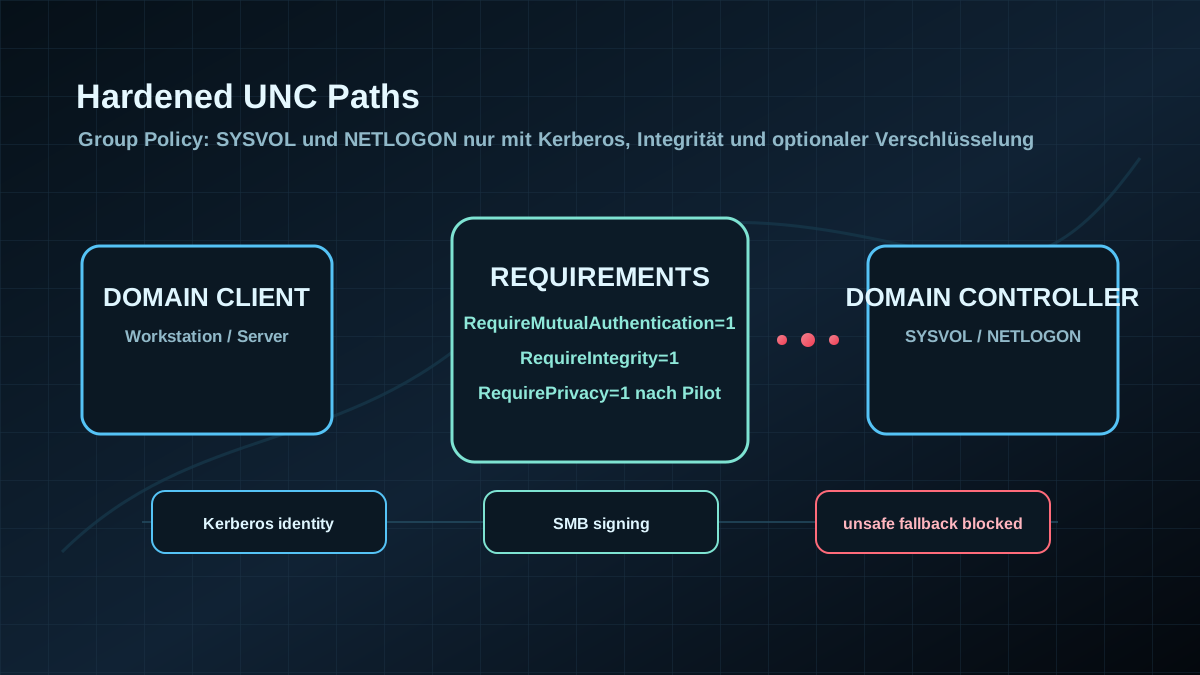
Starting point: Group Policy depends on ordinary-looking shares
In Active Directory, SYSVOL and NETLOGON often look like background plumbing. Everyone knows the paths, but not everyone treats them as a protection boundary. They contain Group Policy files, logon scripts and other content that clients read during startup, sign-in or policy refresh.
The critical part is not only the share. The critical part is the path from client to Domain Controller: name resolution, Kerberos, SMB, DFS referral, site selection and whether the client is really talking to the expected server. If that path is weak, policy and scripts can be loaded through an unsafe transport. That is not a clean operating state for a domain.
Hardened UNC Paths address this exact area. The client receives minimum security requirements for specific UNC paths. If the server cannot meet those requirements, access should fail instead of silently falling back to an unsafe connection.
For AD hardening, start with these paths:
\\*\SYSVOL\\*\NETLOGON
The wildcards are intentional. Clients often access these shares through the domain name, a specific Domain Controller or a DFS referral. The rule therefore should not protect only a single host name.
Target state: policy files are read only over verified SMB sessions
A reliable target state is specific:
- SYSVOL and NETLOGON require mutual authentication. The client does not accept just any SMB server; it expects Kerberos-based server identity.
- SMB integrity is mandatory. In-transit tampering should not be accepted silently.
- SMB encryption is assessed deliberately.
RequirePrivacy=1is useful when clients and Domain Controllers support it cleanly; mixed environments need testing. - The GPO applies to clients and servers, not only to Domain Controllers. The control is enforced by the accessing machine.
- Failures are visible. GroupPolicy and NetworkProvider logs are reviewed so hardened paths are not only configured, but effective.
- Exceptions are documented. Old clients, third-party SMB systems or special paths have an owner, risk acceptance and expiry date.
The goal is not to encrypt every UNC path blindly. The goal is to treat the critical AD paths as what they are: transport paths for trusted configuration.
Implementation: start with SYSVOL and NETLOGON, then expand
1) Check effective policy on clients
Start with a representative client, not the Domain Controller. Hardened UNC Paths are evaluated by the client when it accesses the path.
$path = 'HKLM:\SOFTWARE\Policies\Microsoft\Windows\NetworkProvider\HardenedPaths'

if (Test-Path -LiteralPath $path) {
  Get-ItemProperty -LiteralPath $path |
    Select-Object -Property '\\*\SYSVOL','\\*\NETLOGON'
}
If nothing is shown, that does not automatically mean the client has no protection at all. Modern Windows versions already include protection logic for SYSVOL and NETLOGON. For an AD hardening project, an explicit and auditable GPO is still better: it makes target state, drift and exceptions visible.
Also check:
gpresult /h "$env:TEMP\gpresult.html"

Get-WinEvent -LogName 'Microsoft-Windows-NetworkProvider/Operational' -MaxEvents 50 |
  Select-Object TimeCreated, Id, LevelDisplayName, ProviderName, Message
The event review matters because wrong paths, Kerberos issues or unmet SMB requirements otherwise show up only as generic Group Policy failures in operations.
2) Configure the GPO cleanly
The setting is located here:
Computer Configuration
  Administrative Templates
    Network
      Network Provider
        Hardened UNC Paths
For a robust AD baseline:
Value name: \\*\NETLOGON
Value:      RequireMutualAuthentication=1, RequireIntegrity=1

Value name: \\*\SYSVOL
Value:      RequireMutualAuthentication=1, RequireIntegrity=1
This setting requires Kerberos-based mutual authentication and SMB integrity. In practice, if the client cannot verify server identity properly or SMB signing cannot be satisfied, access should not continue insecurely.
For modern, fully supported environments, also evaluate:
RequirePrivacy=1This enforces SMB Encryption for the affected path. It is stronger, but also the part with the highest compatibility and performance risk. Do not roll it into every domain blindly by copy and paste.
3) Repair Kerberos paths instead of hiding them behind exceptions
RequireMutualAuthentication=1 is stable only when Kerberos works. Typical causes of failure include:
- access by IP address instead of name,
- CNAMEs or aliases that are not represented cleanly as computer names or SPNs,
- DNS drift between sites,
- old clients or appliances,
- manual mapping scripts using wrong UNC names,
- time skew or broken domain trust.
The right response is rarely "disable UNC hardening again". Usually the name and Kerberos path needs repair: use FQDNs, review SPNs, clean up DNS, replace old alias patterns and test DFS namespaces.
4) Pilot RequirePrivacy separately
RequireIntegrity=1 enforces SMB signing. RequirePrivacy=1 enforces SMB Encryption. Encryption effectively includes integrity, but it is not automatically the right immediate step in every environment.
Before RequirePrivacy=1, check:
- Do all relevant clients support SMB 3.x?
- Do all Domain Controllers and affected file servers support SMB Encryption?
- Are there old operating systems, boot/deployment processes or recovery scenarios?
- How do WAN sites, VPN clients and slow links behave?
- Is there monitoring for Group Policy failures after rollout?
A useful sequence is: first deploy RequireMutualAuthentication=1, RequireIntegrity=1 broadly, then test RequirePrivacy=1 in a pilot OU with modern clients and current Domain Controllers. If the environment is clean, encryption for SYSVOL and NETLOGON can become part of the target baseline.
5) Do not scope only Domain Controllers
A common mistake is thinking: "SYSVOL lives on DCs, so we configure DCs." The client enforces the UNC requirement during access. The GPO therefore belongs on domain clients and member servers that load Group Policy and logon scripts.
Applying the setting to Domain Controllers is also reasonable, but it does not solve the main case by itself. The important part is that workstations, terminal servers, application servers, admin workstations and management systems accept protected paths only with the required properties.
6) Extend to other critical UNC paths
After SYSVOL and NETLOGON, a second wave should cover shares that deliver code, configuration or administrative content:
- software distribution,
- central script and tool shares,
- admin tooling,
- deployment shares,
- profile or configuration shares with high impact,
- DFS namespaces with security-relevant content.
Do not solve this with a blanket \\*\* approach. All-wildcard paths are not the right control model and are not treated as a useful Hardened UNC Paths target. Use concrete server/share patterns with owner, test case and rollback.
Advantages
- Protects critical AD transport paths: Group Policy and logon scripts are not loaded blindly across weak SMB sessions.
- Reduces spoofing and tampering risk: Kerberos-based server identity and SMB integrity become mandatory.
- Fits SMB signing and Kerberos hardening: The control complements existing baselines instead of creating a new model.
- Easy to evidence: Registry/GPO,
gpresult, SMB connections and event logs provide clear proof. - Low operating model change: In modern domains, the base variant is usually less invasive than many other AD hardening changes.
- Expandable: After SYSVOL/NETLOGON, additional code and admin shares can be addressed deliberately.
Disadvantages and limits
- Failures look like Group Policy problems quickly: If Kerberos, DNS or SMB is unhealthy, operations first see failed policy processing.
RequirePrivacycan break things: SMB Encryption is not guaranteed for old clients, third-party servers or special processes.- Performance needs review: Signing and especially encryption have costs, mainly on old systems or slow links.
- It does not replace permission hygiene: Wrong SYSVOL ACLs, weak GPO delegation or unsafe scripts remain separate risks.
- It does not protect non-SMB paths: HTTP-based software distribution, cloud shares and local cache issues need separate controls.
- Naming discipline becomes important: IP access, bad aliases and CNAME habits become more visible.
Common project pitfalls
- Linking only to Domain Controllers: The control must reach the systems that access the path.
- Setting
RequirePrivacy=1without a pilot: One legacy dependency can disrupt Group Policy or logon scripts. - Ignoring CNAMEs and IP access: Kerberos-based mutual authentication needs clean names.
- Skipping DFS tests: SYSVOL uses DFS logic; site, referral and DC selection belong in testing.
- Checking only successful access: A successful
dir \\domain\SYSVOLdoes not prove signing, Kerberos and hardening are effective. - Not reviewing NetworkProvider logs: Configuration errors often appear there before becoming broad operational incidents.
- Forgetting other code shares: If software distribution and admin scripts remain weak, only part of the problem is solved.
- Documenting exceptions without expiry: A temporary compatibility decision then becomes the permanent state again.
Project checklist
- [ ] Review existing GPOs and registry values for Hardened UNC Paths on representative clients.
- [ ] Configure
\\*\SYSVOLand\\*\NETLOGONwithRequireMutualAuthentication=1, RequireIntegrity=1as the baseline. - [ ] Link the GPO appropriately to workstations, member servers, admin systems and Domain Controllers.
- [ ] Review
gpresult, GroupPolicy logs andMicrosoft-Windows-NetworkProvider/Operational. - [ ] Test access to
\\domain\SYSVOL,\\domain\NETLOGON, specific DC paths and site changes. - [ ] Fix Kerberos issues through DNS/SPN/name corrections, not broad hardening exceptions.
- [ ] Test
RequirePrivacy=1separately in a modern pilot OU and assess performance. - [ ] Explicitly review legacy clients, deployment processes, recovery flows and third-party SMB systems.
- [ ] Inventory additional critical code, admin and software distribution shares.
- [ ] Document exceptions with owner, reason, expiry date and review date.
- [ ] Monitor for new GroupPolicy and NetworkProvider errors after rollout.