
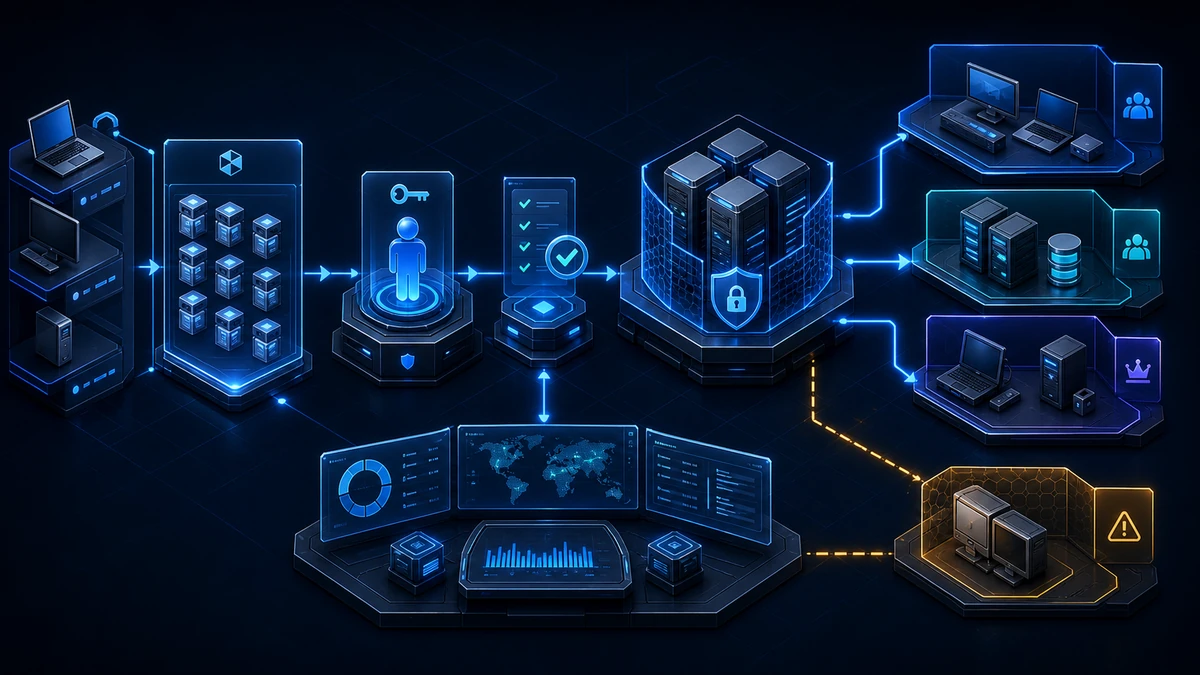
Starting point: a domain join provisions an identity
Joining a Windows device to an Active Directory domain looks like an installation step. In reality, it creates a new security identity or takes control of an existing one. The computer object receives a password, SPNs, a DNS name, group memberships, OU-based policies, and possibly access to other systems. The party controlling this operation influences much more than client connectivity.
The join path is unnecessarily broad in many mature environments:
Authenticated Userscan create computer objects throughms-DS-MachineAccountQuota.- A deployment account is a Domain Admin because that makes every join work.
- Computers land in the default
CN=Computerscontainer instead of a managed OU. - Help desk, software deployment, and server operations use the same join account.
- Pre-staging, the join itself, and later reuse do not have separate roles.
- Old computer objects are reset without checking owner, ACL, or dependencies.
- Passwords appear in task sequences, answer files, scripts, or installation logs.
- Failed account reuse is answered with a compatibility workaround rather than a root-cause review.
Two operations must be distinguished. If no object exists with the device name, a computer object has to be created. If one already exists, the join changes its password, DNS host name, SPNs, account state, and other properties. Reuse is therefore subject to both AD permissions and the ownership checks strengthened since 2022.
Current Windows systems block reuse of an existing computer object when creator, owner, and join identity do not match the permitted model. Error 0xaac / NERR_AccountReuseBlockedByPolicy is then not a random outage but an effective security control. The former NetJoinLegacyAccountReuse registry workaround has not been supported since the August 2024 updates. A dependable fix corrects roles, owners, ACLs, and the central allowlist rather than weakening the client.
MachineAccountQuota = 0 remains an important foundation, but it is not the complete domain-join control. Delegated rights on OUs continue to work independently. The decisive questions are who may create, take over, change, and delete which computer objects in which location.
Target state: provisioning, joining, and reuse are controlled separately
A clean target state has observable properties:
- Normal users cannot create computer objects.
ms-DS-MachineAccountQuotais0, andAdd workstations to domainis not used as a general provisioning path. - Device classes have dedicated OUs. Workstations, member servers, privileged administration systems, VDI, and special devices go directly into the intended policy and delegation boundary.
- Provisioning and joining are separate roles. One constrained identity creates or pre-stages computer objects; another performs the join with only the required rights.
- Join identities are not privileged. They are not Domain Admins, are not standard local administrators on arbitrary systems, and cannot change users, groups, GPOs, or unrelated OUs.
- Computer objects have traceable owners and ACLs. Their creator belongs to a small trusted provisioner group; orphaned owners and individual legacy ACEs are remediated.
- Reuse is explicitly authorized. The
Domain controller: Allow computer account re-use during domain joinpolicy contains trusted creators or owners, not the entire group that merely executes joins. - Offline Domain Join is used deliberately. Where it fits the deployment model, it reduces AD rights on the target device. The provisioning blob is protected like a plaintext password.
- Every join maps to an approved request. Device name, serial number, target OU, owner, deployment ID, executing identity, and timestamp can be correlated.
- Recovery and retirement use the same controls. Secure-channel repair, rejoin, object quarantine, and deletion have documented approvals and recovery steps.
- Telemetry demonstrates enforcement. Computer-account events, Netjoin failures, and DC events for the reuse allowlist are evaluated centrally.
The target is not a single “join account.” It is a provisioning chain in which every identity can perform only its own step and only for the intended device class.
Implementation: reorder the join path from object to device
1) Inventory quota, target OUs, owners, and legacy objects read-only
Start with the effective state, not with the deployment tool's documentation. The following query makes no changes. It reports the domain-wide MachineAccountQuota and, for a representative target OU, creator SID, object owner, and operational indicators:
Set-StrictMode -Version Latest
Import-Module ActiveDirectory -ErrorAction Stop

$domain = Get-ADDomain -ErrorAction Stop
$domainParams = @{
  Identity    = $domain.DistinguishedName
  Properties  = 'ms-DS-MachineAccountQuota'
  ErrorAction = 'Stop'
}
$domainObject = Get-ADObject @domainParams

[pscustomobject]@{
  Domain              = $domain.DNSRoot
  MachineAccountQuota = $domainObject.'ms-DS-MachineAccountQuota'
}

$searchBase = 'OU=Workstations,DC=example,DC=com'
$computerParams = @{
  SearchBase = $searchBase
  Filter     = '*'
  Properties = @(
    'whenCreated'
    'PasswordLastSet'
    'LastLogonDate'
    'ms-DS-CreatorSID'
  )
}

Get-ADComputer @computerParams | ForEach-Object {
  $creatorSid = if ($_.'ms-DS-CreatorSID') {
    [string]$_.'ms-DS-CreatorSID'
  } else {
    $null
  }

  [pscustomobject]@{
    Name              = $_.Name
    DistinguishedName = $_.DistinguishedName
    Owner             = (Get-Acl -Path ('AD:\' + $_.DistinguishedName)).Owner
    CreatorSid        = $creatorSid
    WhenCreated       = $_.whenCreated
    PasswordLastSet   = $_.PasswordLastSet
    LastLogonDate     = $_.LastLogonDate
    Enabled           = $_.Enabled
  }
}
Replace the example DN and work OU by OU. An empty ms-DS-CreatorSID is not automatically suspicious: the attribute is not populated in every privileged or explicitly delegated creation path. Likewise, LastLogonDate and PasswordLastSet alone prove neither current use nor staleness. They are prioritization inputs.
Enrich the data with inherited and explicit ACLs on OUs and computer objects, group memberships, delegation attributes, BitLocker and LAPS recovery dependencies, and the real provisioning source. Individual ACEs for unknown accounts, broad groups with Create Child, orphaned owners, and objects whose names will be reused deserve particular attention.
2) Define device classes and provisioning roles
Establish separate target OUs for at least workstations, member servers, and privileged devices. VDI, kiosks, labs, and appliances need their own OUs when lifecycle or policies differ. The join process must specify the target OU; otherwise new objects can land in the default container and initially bypass the intended GPOs.
Then separate two functions:
- Computer Account Provisioners can create computer objects in precisely defined OUs. They receive delete rights only if the automated lifecycle genuinely requires them.
- Domain Join Executors can take over a correctly pre-staged object and change the properties required for the join.
To reuse an existing object, the executing identity typically needs read and list access, Allowed to authenticate, Change password, Reset password, validated writes to DNS host name and SPN, and Write account restrictions. If the workflow renames objects, it also needs targeted rights to sAMAccountName, display name, and description. Do not translate this list into OU-wide Full Control. Scope it to computer objects, document every additional ACE, and test inheritance and effective access.
A single account that can create, join, reset, and delete objects across every device OU is convenient, but it is not least privilege. Server and PAW provisioning require a tighter boundary than standard clients.
3) Close free object creation and correct the default path
After inventory and pilot, set ms-DS-MachineAccountQuota to 0. Also remove Authenticated Users from Add workstations to domain if the environment still defines that user-right path explicitly. Verify both controls independently: a quota of 0 does not cancel delegated Create Computer objects rights on an OU.
Keep new devices out of the default CN=Computers container. Deployment platforms should always supply the target OU. Alternatively, redircmp can move the domain-wide default to a prepared OU in a controlled change. GPO links, ACLs, provisioning tools, and existing automations must be tested first; the redirection does not move existing objects.
Assign new delegations to stable security groups, not personal administrator or service accounts. Group membership, OU ACL, and business purpose should be versioned as one control and recertified regularly.
4) Design pre-staging and computer-account reuse deliberately
Pre-staging binds device name, target OU, groups, and owner to an approved request before the endpoint contacts the domain. It reduces naming collisions and makes later reuse more predictable. It is secure only when the creator is trusted and the object ACL is clean.
Manage the following policy consistently on every domain controller:
Computer Configuration
  Policies
    Windows Settings
      Security Settings
        Local Policies
          Security Options
            Domain controller: Allow computer account re-use
            during domain join
The allowlist should contain small groups of trusted computer-object creators or owners. The group that only performs the join does not automatically belong there. Authenticated Users, Everyone, or a broad help-desk group would defeat the ownership check.
Clients and domain controllers must have at least the consistent September 2023 hardening update level; current, fully supported patch levels are the operational target. After Group Policy processing, verify the DC events and the generated ComputerAccountReuseAllowList value, but never edit its SDDL directly in the registry.
If reuse fails with 0xaac, first check the object owner, creator group, join identity, ACLs, DC policy, and patch level. Changing only the owner is insufficient when unwanted ACEs from the former creator remain. If the object is genuinely orphaned, delete or reprovision it only after checking groups, SPNs, delegation, LAPS, BitLocker, and operational dependencies.
5) Protect join secrets and offline provisioning
Domain Admin credentials do not belong on a new endpoint or in a task-sequence step. Interactive workflows should prompt without exposing the password; automation should retrieve a dedicated secret briefly from a vault and prevent its appearance in process arguments, transcripts, and logs. The account should not have interactive or RDP logon rights unless its execution model requires them.
Offline Domain Join can further reduce permissions on the target. A provisioning system creates the computer object and a device-specific blob; the endpoint consumes it locally without giving the installer AD write rights. That blob, however, contains the computer-account password and other domain data. Treat it like a plaintext password:
- create a separate blob for each device and request,
- store and transfer it encrypted,
- grant access only to the provisioning service and target device,
- never place it in tickets, golden images, or general package repositories,
- retain it only for a short, defined period,
- delete it after a successful join and define reprovisioning if it is exposed.
Offline join is not automatic evidence of trusted hardware, boot integrity, or device compliance. TPM attestation, Secure Boot, MDM/EDR onboarding, and certificate enrollment remain separate controls.
6) Measure more than the reboot
A successful dialog or exit code says little about the final security state. At minimum, validate the following in the pilot:
- The computer object is in the right OU and has the expected owner.
- Only intended inherited and explicit ACLs are present.
- Device name, DNS host name, and SPNs are consistent and unique.
- The computer account belongs only to approved groups.
- Secure channel and Kerberos authentication work after restart.
- Expected computer GPOs apply; server and PAW baselines take effect immediately.
- Windows LAPS, BitLocker escrow, certificates, EDR, and management agents enroll.
- The machine password rotates within the normal operational window.
- An unauthorized reuse attempt is blocked with
0xaacand becomes centrally visible. - Rejoin and recovery work without a Domain Admin account.
For a broken trust relationship, repair the secure channel before reflexively removing the device from the domain and resetting the object. A rejoin changes identity material again and can hide the original fault and unwanted ACLs.
7) Correlate computer-object and reuse events centrally
Enable Audit Computer Account Management for success on domain controllers and collect at least:
4741for computer-object creation,4742for changes to computer objects,4743for deletion,16995for the effective reuse allowlist,16996for a malformed allowlist,16997for reuse attempts whose previous owner no longer exists,16998for rejected reuse requests.
On joining clients, System events 4100 and 4101 record permitted and blocked reuse. C:\Windows\Debug\netsetup.log is available for troubleshooting, but because it contains environment details, centralize it only when needed and protect it appropriately.
Correlate subject, computer name, target OU, owner, deployment ID, source device, and change window. Creation by unexpected accounts, devices appearing outside provisioning hours, server objects in client OUs, changes to SPNs or delegation, reuse by unrelated identities, and deletion without a retirement request are high-value deviations.
Event 4742 can include routine password and attribute updates. A rule based on the event ID alone will be noisy. Evaluate the changed fields, executing account, device class, and lifecycle state together.
8) Operate retirement and reuse as a controlled lifecycle
Do not immediately delete the computer object when retiring a device. Move it to a quarantine OU, disable it, remove production group memberships, and record the retention period and owner. Before final deletion, determine whether the object still carries LAPS passwords, BitLocker recovery information, certificate mappings, SPNs, or application-specific ACLs.
Later reuse of the same name requires a new approved request. Decide whether the old object can be safely reset or whether a new object creates a cleaner boundary. When crossing device classes, such as client to server, a new object in the correct OU is usually easier to defend than migrating historical ACLs.
Every exception needs an owner, rationale, scope, and expiry date. A permanent “legacy join” group without review gradually becomes an alternative provisioning system.
Advantages
- Fewer privileged credentials: Domain Admin passwords disappear from endpoint and deployment paths.
- Constrained AD write access: Provisioning and join identities can modify only defined computer objects in intended OUs.
- Protection against unsafe reuse: Ownership checks and the allowlist prevent silent takeover of objects created or modified by unrelated identities.
- Policies apply from first boot: Devices immediately enter the correct OU and receive the intended baseline.
- Traceable accountability: Object, owner, deployment request, and executing identity can be correlated.
- Cleaner troubleshooting:
0xaac, DC events, and Netsetup logs point to a concrete cause instead of encouraging broad permissions. - Stronger lifecycle controls: Pre-staging, join, rejoin, quarantine, and deletion use the same checkpoints.
Disadvantages and limits
- More process overhead: Roles, OU ACLs, owner groups, and deployment integrations require maintenance and testing.
- Existing automation can fail: Legacy tools often assume a broadly privileged account or unrestricted object reuse.
- Delegation mistakes cause outages: A missing validated write or incorrect inheritance can stop joins.
- Pre-staging creates stale inventory: Unused requests leave objects behind without expiry and cleanup logic.
- Offline-join blobs are highly sensitive: Reduced AD rights come with a device-specific secret that must be protected.
- A join does not prove endpoint security: Malware, an insecure boot state, or absent EDR are not fixed by domain membership.
- MachineAccountQuota 0 is insufficient alone: Explicit OU delegation and existing computer-object ACLs remain effective.
- Monitoring does not know every business fact: Directory events do not automatically prove that serial number, hardware, and approved request match.
Typical pitfalls
- Adding the deployment account to Domain Admins: This solves permission errors with a permanently overprivileged identity.
- Changing only MachineAccountQuota: Broad
Create Computer objectsdelegation remains effective. - Putting Join Executors on the reuse allowlist: The policy trusts creators or owners, not everyone who executes a join.
- Allowing large groups:
Authenticated Users,Everyone, or general help desk effectively neutralize ownership control. - Setting
NetJoinLegacyAccountReuse: The former client-side workaround is no longer supported. - Changing the owner and ignoring the ACL: Unwanted rights belonging to the former creator can remain.
- Blindly deleting the computer object: Groups, recovery data, SPNs, and application permissions can be lost or become inconsistent.
- Joining everything into
CN=Computers: Target-OU GPOs and delegation apply late or not at all. - Using one account for clients, servers, and PAWs: A single compromise immediately crosses protection classes.
- Putting a password in a command line or answer file: Process lists, logs, backups, and support bundles replicate the secret.
- Treating an offline-join blob as harmless configuration: It contains the computer-account password.
- Testing only successful join: Blocking, reuse, rejoin, quarantine, and recovery remain untested.
- Alerting on every
4742: Normal password and attribute maintenance creates avoidable noise. - Overlooking SAMRPC hardening: An overly restrictive Remote SAM policy on DCs can block current reuse validation and must be included in testing.
Project checklist
- [ ] Inventory
ms-DS-MachineAccountQuotaandAdd workstations to domainseparately. - [ ] Export every OU delegation for computer objects, including inheritance.
- [ ] Document join, pre-staging, rejoin, and deletion paths per deployment platform.
- [ ] Place workstations, servers, PAWs, VDI, and special devices in separate target OUs.
- [ ] Remove
CN=Computersfrom the normal provisioning path. - [ ] Create separate groups for provisioners and Join Executors.
- [ ] Limit rights per device OU and object class to the required minimum.
- [ ] Remove Domain Admin, Enterprise Admin, and broad help-desk membership from join accounts.
- [ ] Set
MachineAccountQuotato0after the pilot. - [ ] Review computer-object owners and individual legacy ACEs.
- [ ] Define trusted creator and owner groups for the reuse allowlist.
- [ ] Do not automatically treat Join Executors as trusted owners.
- [ ] Roll out the computer-account reuse GPO consistently to every DC.
- [ ] Verify current patch levels on clients and domain controllers.
- [ ] Remove registry workarounds and manually configured reuse SDDL.
- [ ] Bind pre-staging to device name, serial number, target OU, and request.
- [ ] Remove join secrets from scripts, task-sequence logs, and answer files.
- [ ] Test vault access, rotation, and logon restrictions for provisioning identities.
- [ ] Use Offline Domain Join only with encrypted, device-specific blobs.
- [ ] Define deletion or reprovisioning for exposed ODJ blobs.
- [ ] Pilot creation, pre-staging, permitted reuse, and blocked reuse.
- [ ] Validate owner, ACL, OU, SPNs, DNS, secure channel, and GPO application after each pilot.
- [ ] Verify LAPS, BitLocker escrow, certificates, EDR, and management onboarding.
- [ ] Collect events
4741,4742,4743, and16995through16998centrally. - [ ] Integrate client events
4100and4101and Netsetup logs into support workflows. - [ ] Correlate deviations with deployment ID, owner, source device, and change window.
- [ ] Test secure-channel repair before a complete rejoin.
- [ ] Define a quarantine OU, retention period, and final deletion review.
- [ ] Track exceptions with owner, rationale, scope, and expiry date.
- [ ] Recertify OU ACLs, allowlist groups, and unused computer objects regularly.