
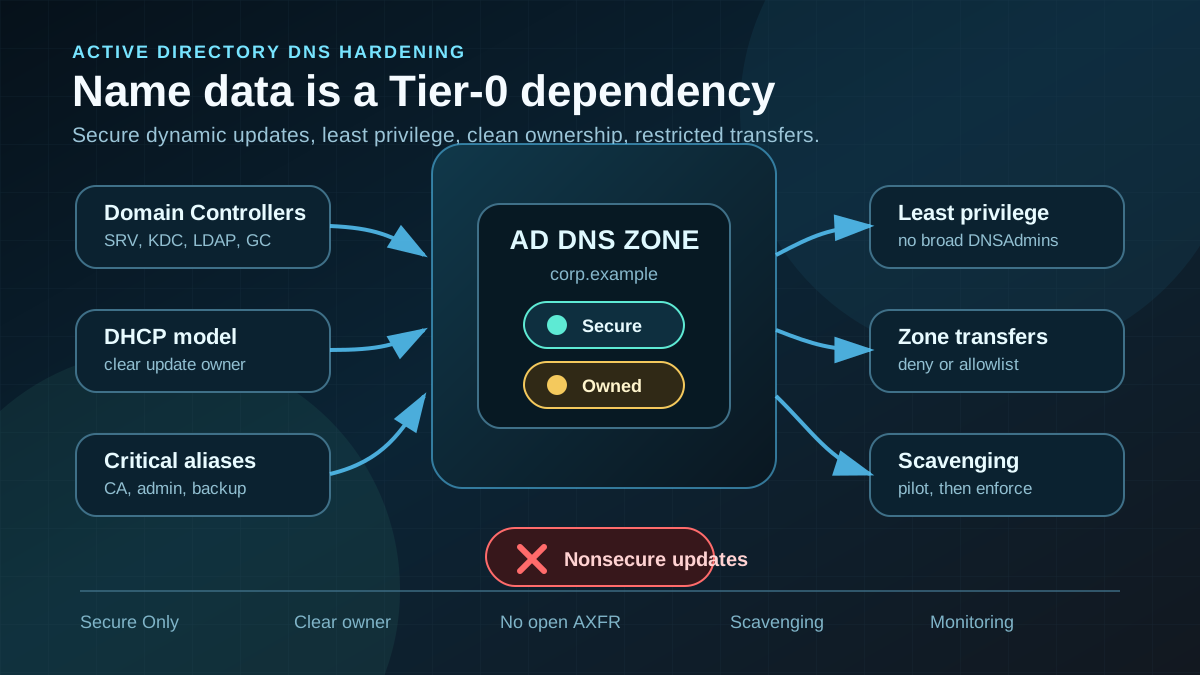
Starting point: DNS is part of identity control
Active Directory does not work without DNS. Domain Controllers are located through SRV records, Kerberos depends on clean names, clients look up LDAP, GC and KDC endpoints, applications use CNAMEs, and administrators work with hostnames that nobody has deliberately reviewed for years. When AD-integrated DNS zones are poorly governed, this is not just an availability topic.
Typical problems look harmless: dynamic updates still allow NonsecureAndSecure, old A records point to reused IP addresses, reverse zones were never hardened, DHCP servers own records that other DHCP servers can no longer update, or DNSAdmins has become a convenient operations group. Add zone transfers to systems nobody owns anymore and manual records without an owner.
The security risk does not come from DNS alone. It appears when name data is no longer trustworthy. Clients may land on the wrong destinations, Kerberos may fail in confusing ways, old systems remain discoverable, and critical services may appear reachable under names that should no longer exist.
Target state: DNS zones are controlled infrastructure
A clean target state for AD-integrated DNS zones has specific properties:
- Production AD zones accept only secure dynamic updates. Nonsecure updates are not the default for domain zones.
- Record ownership is understandable. It is clear whether the client, DHCP server or operations team creates and updates a record.
- Zone permissions are narrow.
DNSAdmins, Domain Admins and broad helpdesk groups are not the normal path for routine DNS changes. - Zone transfers are disabled or allowlisted. AD-integrated replication often replaces classic AXFR paths.
- Stale records are cleaned up in a controlled way. Aging and scavenging are planned, piloted and documented, not enabled globally on impulse.
- Critical records are monitored. Changes to DC, KDC, LDAP, CA, admin and management names are actionable events.
The goal is not to make DNS rigid. The goal is to treat name data as part of the AD security boundary.
Implementation: harden one zone at a time
1) Inventory zones and settings
Start with a read-only inventory. Do not look only at forward lookup zones. Include reverse zones, _msdcs, delegated subzones, old test zones and any secondaries.
An initial view of zone type, AD integration, dynamic updates and transfer settings:
Import-Module DnsServer

Get-DnsServerZone |
  Select-Object ZoneName,ZoneType,IsDsIntegrated,DynamicUpdate,ReplicationScope,SecureSecondaries,Notify |
  Sort-Object ZoneName
Aging and scavenging deserve a separate view:
Get-DnsServerZone |
  Where-Object { $_.ZoneType -eq 'Primary' } |
  ForEach-Object {
    Get-DnsServerZoneAging -Name $_.ZoneName -ErrorAction SilentlyContinue
  }
The output is not the assessment yet. It quickly shows which zones are not AD-integrated, where nonsecure updates are allowed, where zone transfers are open, and where scavenging is missing or unclear.
2) Make secure dynamic updates the default
For AD-integrated domain zones, Secure is the target state. NonsecureAndSecure should only be a deliberately time-boxed legacy exception, ideally in a separate zone with a migration plan.
Example for a planned change with preview:
Set-DnsServerPrimaryZone `
  -Name "corp.example" `
  -DynamicUpdate Secure `
  -WhatIf
Before the production change, you need to know who updates records. Windows clients, Domain Controllers, DHCP servers, clusters, appliances and monitoring systems may all use different update paths. If those paths are not understood, hardening turns into troubleshooting instead of risk reduction.
Not every zone needs dynamic updates. Static infrastructure zones, management zones or delegated special-purpose zones can often use None. The important part is that the decision is deliberate for each zone.
3) Model DHCP updates and record ownership
Many DNS issues are caused by unclear DHCP registration, not by the DNS server itself. Sometimes the client registers its A record and DHCP only registers the PTR record. Sometimes DHCP registers both. Sometimes old DHCP servers own records that newer DHCP servers cannot update.
Useful guardrails:
- Document DHCP servers and scopes that are allowed to update DNS records.
- Use a dedicated normal domain account for DHCP DNS updates when multiple DHCP servers must manage records consistently.
- Do not give that account administrative privileges.
- Assess DHCP running on Domain Controllers especially carefully.
- Remove old DHCP servers, test scopes and shadow DHCP services from the update path.
- Document owner, purpose and change process for critical static records.
The point is not to force one DHCP model onto every environment. The point is that record ownership must be known before hardening.
4) Reduce zone and record permissions
AD-integrated DNS zones live in Active Directory. DNS permissions are therefore AD permissions. Broad write access to a production zone is both a security and operations risk.
Review especially:
- Who is a member of
DNSAdmins? - Are there groups with write access to the zone that only need to manage individual records?
- Can normal operations groups modify records for Tier-0 systems?
- Are manual delegations documented?
- Do records for DCs, CAs, admin jump hosts, backup servers or management systems have unusual ACLs?
For daily operations, a small number of clear delegated processes is usually better than many people with full DNS access. A helpdesk does not automatically need rights to the whole domain zone because it occasionally changes an alias.
5) Restrict zone transfers and notifications
AD-integrated zones replicate through Active Directory. Classic zone transfers are often unnecessary. If secondaries, appliances, monitoring systems or special DNS servers truly need zone transfers, put them on an allowlist.
Example for a zone without AXFR need:
Set-DnsServerPrimaryZone `
  -Name "corp.example" `
  -SecureSecondaries NoTransfer `
  -Notify NoNotify `
  -WhatIf
Example for defined secondaries:
Set-DnsServerPrimaryZone `
  -Name "corp.example" `
  -SecureSecondaries TransferToSecureServers `
  -SecondaryServers 10.10.20.53,10.10.20.54 `
  -Notify NotifyServers `
  -NotifyServers 10.10.20.53,10.10.20.54 `
  -WhatIf
Open zone transfers are rarely justified. They expose internal naming data and make old architecture easier to map than operations usually require.
6) Introduce aging and scavenging carefully
Scavenging is useful, but it is not a side-effect-free quick win. It deletes records. Misconfigured scavenging can remove critical names or surface old operational mistakes that were hidden by static or stale records for years.
A controlled sequence:
- Review stale records first, do not delete immediately.
- Mark critical static records and clarify ownership.
- Choose no-refresh and refresh intervals that match DHCP leases and the operating model.
- Pilot aging per zone.
- Enable scavenging only on defined DNS servers and monitor the outcome.
- Actively review deleted records and affected systems during the first phase.
Example pilot configuration with preview:
$interval = New-TimeSpan -Days 7

Set-DnsServerZoneAging `
  -Name "corp.example" `
  -Aging $true `
  -NoRefreshInterval $interval `
  -RefreshInterval $interval `
  -WhatIf
In environments with many mobile clients, VPNs, VDI, clusters or short-lived servers, the timing model must match reality. Otherwise scavenging is either ineffective or too aggressive.
7) Monitor critical records
DNS changes are often investigated only after name resolution breaks. For AD hardening, that is too late. Critical records should be monitored like other identity and Tier-0 changes.
Especially relevant:
_ldap._tcp,_kerberos._tcp,_gc._tcpand_msdcsrecords,- A and CNAME records for Domain Controllers,
- CA, NDES, OCSP and enrollment endpoints,
- admin jump hosts, PAWs, backup and management systems,
- file server and application aliases with broad usage,
- new zones, deleted zones and changed zone-transfer settings.
Monitoring does not need to start with alerts for every client refresh. The useful distinction is between normal dynamic client updates and changes to privileged names, zone permissions or server settings.
8) Roll out in waves
A pragmatic sequence:
- Inventory all AD-integrated zones, reverse zones and special zones.
- Prioritize zones with
NonsecureAndSecure, open transfers or unclear ACLs. - Clarify DHCP update model and record ownership.
- Choose a low-risk zone or pilot OU for secure updates and scavenging.
- Back up and document critical records and static entries before changes.
- Move zone transfers to
NoTransferor defined secondaries. - Validate changes with DNS, DHCP, Kerberos, LDAP and application tests.
- Move the target state into operations documentation, monitoring and change process.
The important point: DNS hardening is not one setting. It is a combination of update security, permissions, ownership, cleanup and monitoring.
Advantages
- Fewer unauthorized name changes: production AD zones no longer accept arbitrary nonsecure updates.
- More stable AD dependencies: DC locator, Kerberos, LDAP, GPO and application names become more reliable.
- Better transparency: it becomes clearer who creates, updates and owns records.
- Less legacy debris: stale records and old test names disappear in a controlled way.
- Reduced information exposure: zone transfers provide internal naming data only to defined systems.
- Better operations: DNS issues are detected earlier because ownership and monitoring are clearer.
Disadvantages and limits
- Preparation is required: without a zone inventory, DHCP model and record owners, the change is risky.
- Legacy can break: old appliances, non-Windows systems or manual processes may have depended on nonsecure updates.
- Scavenging can cause real outages: if critical records age incorrectly, production names can disappear.
- More change discipline: DNS changes need owner, ticket, test and rollback path.
- Not every issue is DNS: Kerberos, SPN, time and firewall issues often look like DNS problems.
- Delegation remains hard: fine-grained DNS rights are cleaner but more work than one broad admin group.
Typical pitfalls
- Treating DNS as infrastructure only: in AD, DNS is part of the identity and Tier-0 dependency chain.
- Tolerating
NonsecureAndSecureas normal: at most, this should be a time-boxed legacy exception. - Putting helpdesk into
DNSAdmins: full access is rarely the right fix for occasional alias changes. - Forgetting reverse zones: PTR records, DHCP and troubleshooting often depend on them.
- Enabling scavenging globally: without pilot, owner and review, it can delete production names.
- Allowing zone transfers to everyone: internal naming data becomes unnecessarily easy to copy.
- Ignoring DHCP ownership: multiple DHCP servers without a clear update model create inconsistent records.
- Not monitoring critical records: changes to DC, KDC, CA or admin names are security-relevant.
Project checklist
- [ ] Inventory all forward, reverse,
_msdcsand special-purpose zones. - [ ] Document
IsDsIntegrated,DynamicUpdate,ReplicationScope,SecureSecondariesandNotifyper zone. - [ ] Prioritize zones with
NonsecureAndSecureor open transfers. - [ ] Clarify DHCP servers, DHCP DNS credentials and record ownership.
- [ ] Review
DNSAdminsmembership and delegated zone permissions. - [ ] Mark critical records for DCs, CAs, admin, backup and management systems.
- [ ] Restrict zone transfers to
NoTransferor defined secondaries. - [ ] Test secure dynamic updates in a pilot scope first.
- [ ] Pilot aging and scavenging with suitable intervals.
- [ ] Run DNS, DHCP, Kerberos, LDAP and application tests after changes.
- [ ] Add monitoring for critical DNS changes and new zones.
- [ ] Include DNS changes in the change process, operations documentation and review cycle.