
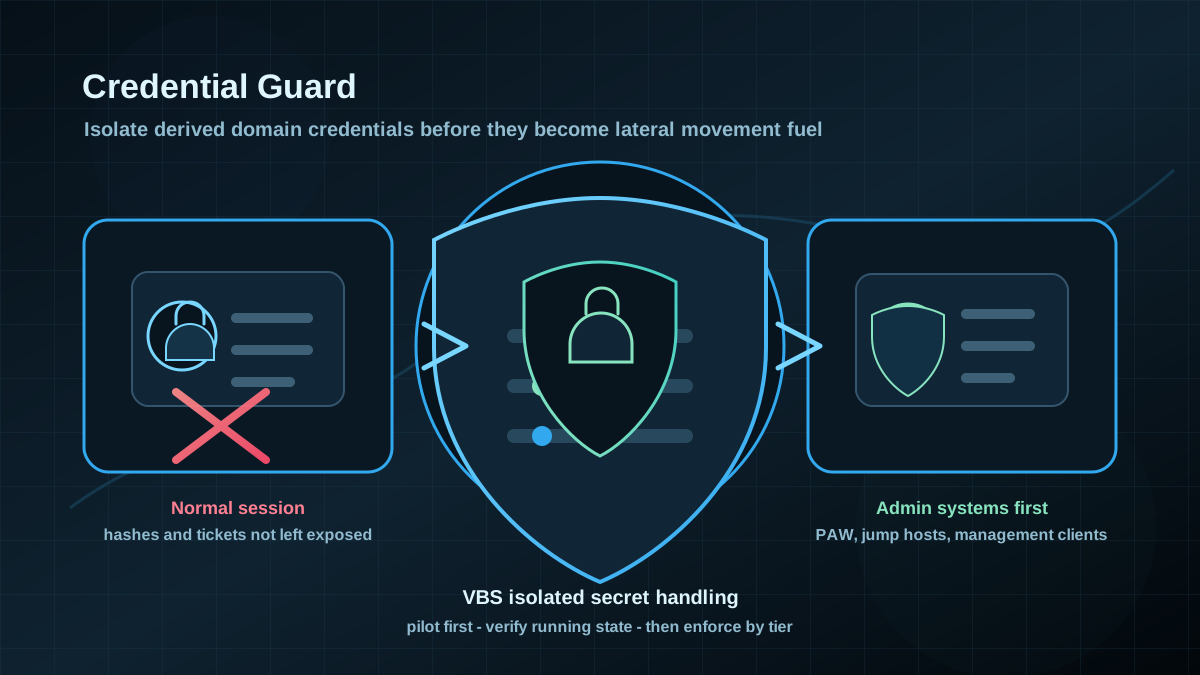
Starting point: credentials stay reachable for too long
Many AD compromises do not become severe because one user account was compromised. They become severe because a client, admin host or server still exposes usable credentials: NTLM hashes, Kerberos tickets, cached logon material or artifacts from interactive admin sessions. Once an attacker reaches local admin on a system, "one host affected" can quickly become "more identities affected".
Credential Guard reduces that lever. It uses Virtualization Based Security to move certain derived domain credentials out of the normal Windows environment. LSASS remains visible and usable for Windows, but sensitive secrets are handled in an isolated process area. This does not make credential theft impossible, but it raises the cost significantly and removes several common lateral movement paths.
Set the expectation clearly: Credential Guard is not a standalone AD security strategy. It does not replace tiering, admin workstations, MFA, service account hygiene or NTLM reduction. It is a protection layer for systems where domain credentials are especially valuable or where privileged sessions occur regularly.
Target state: Credential Guard where credentials matter
A strong target state has specific properties:
- Admin and Tier-0 workstations use Credential Guard by default. Systems used for domain, server, PKI, backup and identity administration are handled first.
- Standard clients follow in waves. Broad rollout comes after pilot, compatibility testing and a clear exception process.
- VBS, Secure Boot and hypervisor prerequisites are known. Firmware, BIOS settings and incompatible drivers do not derail the rollout.
- SSO, VPN, RDP and legacy dependencies are tested. Saved credentials, old authentication paths and selected credential providers are reviewed up front.
- UEFI lock is handled deliberately. During the pilot, rollback stays simple. After stabilization, decide whether more tamper-resistant settings are useful.
- Compliance is measurable. Intune, MDE, ConfigMgr, GPO reporting or custom PowerShell checks show where Credential Guard is configured and where it is actually running.
The goal is not to flip one setting globally as fast as possible. The goal is to move usable domain credentials on the most important Windows systems out of the normal attack path in a controlled way.
Implementation: validate first, then roll out in waves
1) Define scope by risk
Do not start with every client. Start with systems where high-value identities are used:
- Privileged Access Workstations and admin jump hosts,
- helpdesk and server administration clients,
- systems used for Domain Controllers, AD CS, Entra Connect, backup, EDR, PAM and virtualization,
- management servers that regularly run privileged tools,
- high-criticality client groups with access to sensitive business data.
Domain Controllers need their own assessment. Credential Guard is primarily a client and workstation hardening control for credential isolation. On DCs, controls such as tiering, LSASS Protected Process, restricted logon paths, patch discipline and access control are decisive. Do not blindly put DCs into the same scope as normal clients.
2) Capture prerequisites in read-only mode
Before using GPO or an Intune policy, understand which systems are technically ready. At minimum, check firmware mode, Secure Boot, virtualization and current VBS status.
Read-only starting point on a test system:
$ns = 'root\Microsoft\Windows\DeviceGuard'

Get-CimInstance `
  -ClassName Win32_DeviceGuard `
  -Namespace $ns |
  Select-Object `
    VirtualizationBasedSecurityStatus,
    SecurityServicesConfigured,
    SecurityServicesRunning,
    RequiredSecurityProperties,
    AvailableSecurityProperties
Secure Boot is worth checking separately:
Confirm-SecureBootUEFIInterpret the output per operating system version and hardware model. Different values in SecurityServicesRunning are normal across a fleet because VBS, Hypervisor Code Integrity and Credential Guard can be represented as separate service properties. For rollout, the important part is that you use the same measurement point consistently and do not confuse "policy assigned" with "protection active".
3) Test compatibility before enforcement
Credential Guard changes authentication behavior. That is intentional, but it can break old operational assumptions. Test especially:
- RDP with saved domain credentials,
- VPN, Wi-Fi and 802.1X clients,
- third-party credential providers and SSO agents,
- smart card and certificate logon,
- applications with old NTLM or CredSSP dependencies,
- helpdesk tools, remote support and endpoint management,
- developer or admin workflows with RunAs, MMC, RSAT and PowerShell Remoting.
Testing must include real workflows. A successful Windows sign-in is not enough. The pilot is credible only when admins can use their normal tools, remote paths work and old saved credentials do not silently appear as an operations dependency.
4) Configure policy through GPO or MDM
In classic AD environments, rollout often uses Group Policy:
Computer Configuration
  Administrative Templates
    System
      Device Guard
        Turn On Virtualization Based Security
Important decisions:
- enable Virtualization Based Security,
- enable Credential Guard,
- use Secure Boot as a protection anchor,
- avoid UEFI lock during the pilot or use it very deliberately,
- apply GPO only to pilot OUs or clearly defined security groups.
In Microsoft 365-heavy environments, the same target can be represented through Intune Security Baselines or Endpoint Security Policies. The tool is less important than scope, evidence and rollback planning.
5) Keep the pilot small but real
A useful pilot is small but representative:
- Select two to five hardware models or standard client builds.
- Test admin and non-admin usage separately.
- Validate VPN, RDP, Wi-Fi, SSO, browser, RSAT, PowerShell Remoting and EDR health.
- Include helpdesk and endpoint teams in troubleshooting.
- Watch events, support tickets and performance anomalies for at least one normal working cycle.
If Credential Guard is not measurable in the pilot, the pilot is not finished. "GPO linked" or "Intune profile assigned" is only the start. The relevant state is whether Credential Guard is really running on the endpoint.
6) Verify activation
On a single system, a pragmatic check is:
Get-Process `
  -Name LsaIso `
  -ErrorAction SilentlyContinue
The isolated LSA process is a strong signal, but it does not replace fleet measurement. Combine process visibility, Win32_DeviceGuard, endpoint management compliance and security telemetry.
For a rough local status view:
$ns = 'root\Microsoft\Windows\DeviceGuard'

Get-CimInstance `
  -ClassName Win32_DeviceGuard `
  -Namespace $ns |
  Select-Object `
    VirtualizationBasedSecurityStatus,
    SecurityServicesConfigured,
    SecurityServicesRunning

Get-Process `
  -Name LsaIso `
  -ErrorAction SilentlyContinue
For the fleet, put the check into existing management tooling. Individual PowerShell output is useful for analysis and troubleshooting, but it is not a durable compliance system.
7) Keep exceptions narrow and time-boxed
Exceptions are realistic. Some old application, VPN component or remote support path may slow the rollout. Still, exceptions should not become a second normal state.
A useful exception includes:
- affected systems or groups,
- business owner,
- specific technical reason,
- risk decision,
- expiration date,
- planned replacement or vendor clarification,
- compensating controls such as less privileged use, restricted admin logons or network segmentation.
Without an expiration date, Credential Guard can become a policy for "all new devices except the important legacy systems". Those legacy systems are often exactly where valuable sessions still happen.
8) Roll out in waves
A pragmatic sequence:
- Prioritize target groups by AD risk.
- Capture hardware, firmware and VBS readiness.
- Build pilot OUs or pilot device groups.
- Test Credential Guard without a hard rollback blocker.
- Validate SSO, VPN, RDP, admin tools and EDR compatibility.
- Build compliance measurement.
- Make Tier-0 and admin systems mandatory first.
- Add standard clients in waves.
- Time-box and review exceptions regularly.
- Move the target state into client baselines and join/provisioning processes.
Credential Guard is strongest when new systems are provisioned correctly from the start. Retrofitting a heterogeneous fleet remains possible, but it is much more work.
Advantages
- Fewer usable credentials in the normal OS context: NTLM hashes and Kerberos material become harder to obtain from a compromised session.
- Better protection for admin workflows: privileged sessions on PAWs, admin clients and management systems become more resilient.
- Strong tiering signal: systems that handle valuable identities get a measurable technical barrier.
- Fits other AD controls: LSASS Protected Process, WDigest-off, NTLM reduction, Protected Users and restrictive logon paths complement each other.
- Good compliance potential: status can be proven through operating system and endpoint management data.
- No new third-party product required: the function is part of modern Windows security architecture when edition, hardware and management are suitable.
Disadvantages and limits
- Not every system is suitable: old hardware, BIOS/UEFI settings, drivers or virtualization requirements can block rollout.
- Compatibility is the main workload: SSO, VPN, RDP, credential providers and legacy authentication need real testing.
- Rollback can become hard: UEFI lock variants make rollback more difficult. Do not put that into a pilot unprepared.
- Not all secrets are protected: local accounts, browser tokens, application secrets and already compromised sessions need separate controls.
- No replacement for least privilege: if admins can work interactively everywhere, Credential Guard only reduces part of the damage.
- Operations needs measurement: without compliance data, assigned policies can create false confidence.
Typical pitfalls
- Checking only "enabled" in policy: the key question is whether Credential Guard is actually running on the endpoint.
- Setting UEFI lock too early: a pilot must remain easy to roll back.
- Not prioritizing admin systems: broad client rollout is good, but Tier-0 and admin workstations provide the highest risk reduction.
- Forgetting RDP and saved credentials: old workflows often fail there first.
- Leaving out SSO agents: third-party credential providers can create unexpected side effects.
- Not time-boxing exceptions: permanent exception groups undermine the security gain.
- Selling Credential Guard as a cure-all: it is a protection layer, not a replacement for AD tiering, MFA, PAWs and clean privileges.
- No new provisioning rule: new devices must receive the target baseline immediately, otherwise rollout remains catch-up work.
Project checklist
- [ ] Define admin, Tier-0, helpdesk and management systems as the first scope.
- [ ] Capture hardware models, firmware mode, Secure Boot, virtualization and VBS status.
- [ ] Define the target state for GPO, Intune or ConfigMgr.
- [ ] Decide UEFI lock strategy separately and do not enable it casually in the pilot.
- [ ] Test VPN, Wi-Fi, RDP, SSO, smart card, RSAT, PowerShell Remoting and EDR compatibility.
- [ ] Build a pilot group with real admin workflows.
- [ ] Verify activation through
Win32_DeviceGuard,LsaIsoand endpoint management compliance. - [ ] Document support and rollback process for pilot devices.
- [ ] Track exceptions with owner, reason, expiration date and compensating controls.
- [ ] Make Tier-0 and admin systems mandatory first.
- [ ] Add standard clients in waves.
- [ ] Move the target baseline into provisioning, join process and regular compliance reviews.