
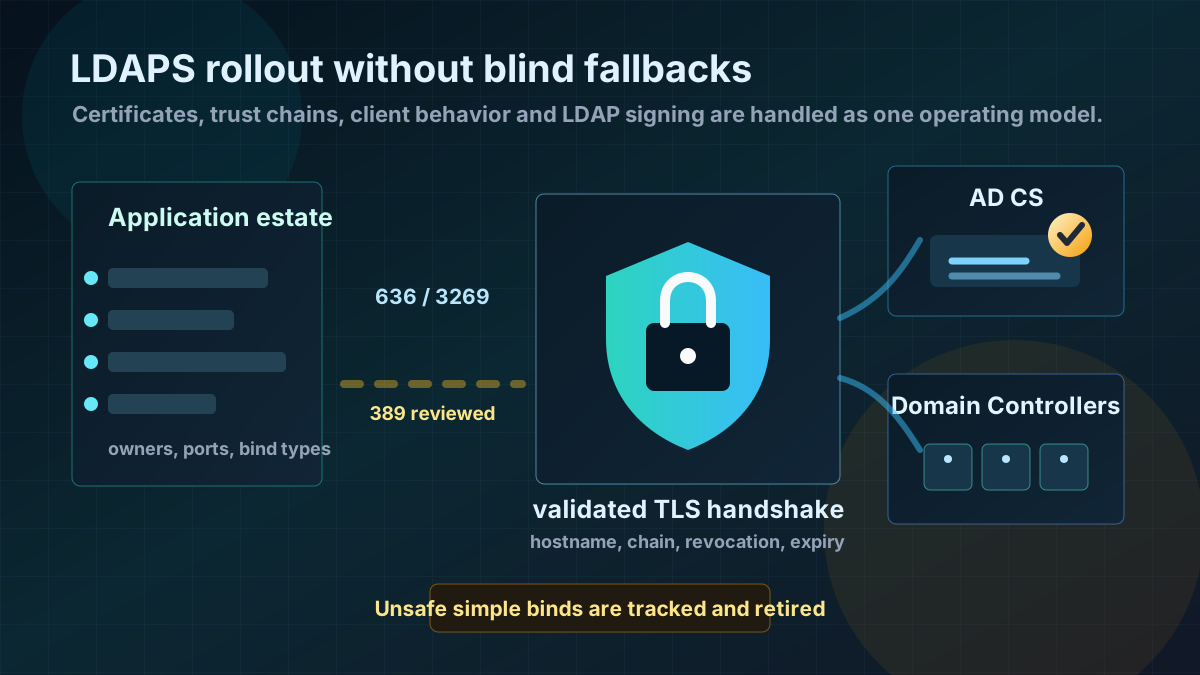
Starting point: LDAP often stays unsafe longer than planned
Many Active Directory environments have years of application integrations that simply say "LDAP", while doing very different things: Kerberos or NTLM-based binds, anonymous searches, simple binds with username and password, Global Catalog lookups, hardcoded Domain Controllers or libraries that silently ignore certificate errors.
LDAPS addresses only part of that problem: transport over TLS, typically on port 636 for LDAP and 3269 for the Global Catalog. That matters, but it does not replace LDAP signing, channel binding, clean service accounts or a reviewed application estate. If the project only opens port 636 and leaves everything else untouched, the target state is usually weak.
The practical challenge is usually not the Domain Controller. Once a suitable certificate exists, a DC can provide LDAPS. The hard part is the inventory: Which systems speak LDAP? Which ones use simple binds? Which ones do not trust the internal CA? Which ones do not verify hostnames correctly? And which application silently falls back to unencrypted LDAP when certificate validation fails?
Target state: TLS is normal, fallbacks are justified
A usable target state is specific:
- Every Domain Controller has an individual valid server certificate. Certificates include suitable DNS names, a trusted chain, Server Authentication suitability and automated renewal.
- LDAP clients fully validate certificates. Trust chain, hostname, validity and revocation status are checked; certificate errors are not disabled by configuration.
- Applications deliberately use LDAPS or signed/sealed LDAP connections. Simple binds over cleartext LDAP are no longer the normal operating mode.
- Global Catalog queries are reviewed separately. Teams using
3268need to know whether3269is required and which applications truly need forest-wide searches. - Port 389 is not blindly open for everything. Classic LDAP traffic is assessed by purpose, source network and bind type instead of being broadly blocked or broadly accepted.
- Certificate operations are monitored. Expiry, autoenrollment, CRL/AIA reachability and Schannel errors are visible.
The goal is not "everything must be called LDAPS". The goal is to operate sensitive LDAP bind and search paths so credentials are not transferable in cleartext and clients actually talk to the expected Domain Controller.
Implementation: build the certificate base first, then migrate clients
1) Inventory LDAP traffic and simple binds
Before changing controls, build a dependency list. Start with Domain Controllers, firewall logs, load balancer logs, application documentation and Windows events.
Typical questions:
- Which source IP talks to Domain Controllers on
389,636,3268or3269? - Which applications use simple binds with username and password?
- Which systems use hardcoded DC names instead of DNS or service concepts?
- Are there appliances, scanners, IAM systems, VPN gateways, print systems or web applications with their own LDAP library?
- Are there remote sites or DMZ segments that should reach only specific DCs?
LDAP interface events and network data on Domain Controllers help, but they do not replace application review. Older Java, PHP, network and identity products often have their own TLS trust stores. In those cases LDAPS fails not because of AD, but because the CA was never imported or hostname validation is wrong.
2) Roll out Domain Controller certificates cleanly
LDAPS requires each Domain Controller to have a suitable certificate in the local computer certificate store. In Microsoft-centric environments, AD CS with autoenrollment is usually the cleanest path.
Important requirements:
- private keys per Domain Controller, not one shared certificate for all DCs,
- Server Authentication suitability,
- DNS names that clients actually use, especially the DC FQDN,
- modern signature and key lengths,
- trusted Root and Intermediate CA on all LDAP clients,
- reachable CRL and AIA paths,
- automatic renewal before expiry.
Avoid special cases such as manually imported PFX files without a renewal path, self-signed certificates, wildcards or certificates whose names only accidentally match an alias. LDAPS depends on correct server authentication. If clients later have to disable certificate validation, the target has been missed.
3) Validate LDAPS technically on every DC
After rollout, a simple port test is not enough. Test-NetConnection only shows whether 636 is reachable. What matters is whether the TLS handshake works with the expected name, the right chain and an accepted certificate.
A pragmatic Windows test is:
$server = 'dc01.corp.example'
$client = [Net.Sockets.TcpClient]::new()
$client.Connect($server, 636)

$stream = [Net.Security.SslStream]::new(
  $client.GetStream(),
  $false,
  { param($sender, $cert, $chain, $errors) $errors -eq [Net.Security.SslPolicyErrors]::None }
)

$stream.AuthenticateAsClient($server)
[pscustomobject]@{
  Server      = $server
  Protocol    = $stream.SslProtocol
  Cipher      = $stream.NegotiatedCipherSuite
  Certificate = $stream.RemoteCertificate.Subject
}

$stream.Dispose()
$client.Dispose()
This test is not meant to validate credentials. It validates the transport base. After that, run application tests with the real LDAP libraries. That is where poorly maintained trust stores, short hostnames, IP access or disabled certificate validation show up.
4) Migrate applications deliberately
For each application, document:
- LDAP purpose: authentication, group lookup, address book, provisioning or health check,
- target port:
636for LDAP or3269for Global Catalog, - name used: FQDN instead of IP address,
- service account with minimal rights,
- TLS trust store and hostname validation,
- timeout and failover behavior,
- behavior during certificate expiry or DC failover.
Many outages do not happen during the first test. They happen during failover. An application works against dc01, but fails against dc02 because certificates, names or trust stores are not consistently clean. Test every DC in the intended search path, not only the application's favorite DC.
5) Do not leave out LDAP signing and channel binding
LDAPS encrypts transport. LDAP signing and channel binding address different risks and should not fall out of the project.
For AD hardening, the sequence is usually:
- Make LDAP usage and simple binds visible.
- Establish LDAPS and certificate validation cleanly for applications.
- Tighten LDAP signing and channel binding deliberately.
- Remove unsafe binds and unnecessary fallbacks.
- Document exceptions and give them an expiry date.
A common mistake is treating LDAPS as a free pass for every old bind method. If a product can only use simple bind, LDAPS reduces the credential transport problem. It does not automatically fix weak service accounts, missing MFA at the application, poor group filters or overly broad read permissions.
6) Set network rules with operational awareness
Broadly blocking port 389 on all Domain Controllers is rarely a clean first move. AD also uses LDAP for legitimate signed and authenticated operations. A hard firewall block can unexpectedly hit sign-ins, policy processing, applications or monitoring.
A better pattern is:
- explicitly migrate application segments to
636or3269, - remove LDAP access from networks that do not need it,
- limit DC access to known source systems,
- treat domain client and server communication separately from application LDAP,
- reduce unsafe simple binds through policy, monitoring and application changes.
DMZ, VPN, NAC, PAM or IAM systems deserve their own rule matrix. For those systems it is usually clearer which sources should be allowed to speak LDAP to Domain Controllers at all.
Advantages
- Protects credentials in transit: Simple binds no longer send passwords over cleartext LDAP.
- Strengthens server authentication: Clients can verify that they are talking to the expected Domain Controller.
- Improves application operations: LDAP dependencies, service accounts, trust stores and failover behavior become visible.
- Creates a better base for further LDAP hardening: Signing, channel binding and later fallback reduction become easier to plan.
- Makes certificate operations auditable: Autoenrollment, expiry monitoring and CA trust are measurable controls.
- Reduces ad-hoc exceptions: Applications get clear target ports, names and owners.
Disadvantages and limits
- Certificate operations become critical: Expired DC certificates, broken autoenrollment GPOs or unreachable CRLs can disrupt applications.
- Legacy clients become visible: Old appliances and libraries often support LDAPS only with weak or incomplete certificate validation.
- LDAPS does not replace permission hygiene: Poor LDAP filters, overprivileged service accounts and broad read access remain separate issues.
- Port 389 does not automatically disappear: Signed LDAP usage can remain legitimate; blanket blocks are risky.
- Global Catalog needs separate review:
3269is not only "636 on another port"; it depends on search scope and application behavior. - Failover becomes more demanding: Every DC in the path needs suitable certificates and consistent reachability.
Common project pitfalls
- Testing only
636: An open port does not prove a valid TLS handshake or proper certificate validation. - Disabling certificate validation in clients: Encryption remains, but server authentication is effectively abandoned.
- Using IP addresses instead of names: Hostname validation cannot work cleanly.
- Checking only one Domain Controller: Failover to a second DC then breaks during maintenance or an outage.
- Forgetting CRL/AIA reachability: Strict clients reject connections when revocation data cannot be reached.
- Confusing LDAPS with LDAP signing: TLS alone does not replace every LDAP protection mechanism.
- Reflexively using public CA or wildcard certificates: Internal DC certificates need clear names, renewal and controlled private keys.
- Involving application owners too late: LDAP is often hidden in configuration that only the business application team knows.
Project checklist
- [ ] Inventory LDAP targets, source systems and ports
389,636,3268,3269from logs and application data. - [ ] Identify simple LDAP binds and applications that bind with username and password.
- [ ] Review or create an AD CS certificate template for Domain Controllers.
- [ ] Enable autoenrollment for all Domain Controllers and verify certificate issuance.
- [ ] Test Root/Intermediate CA, CRL and AIA reachability from relevant LDAP clients.
- [ ] Validate LDAPS handshake per Domain Controller with FQDN and certificate validation.
- [ ] Migrate applications to
636or3269and test with the real LDAP library. - [ ] Clean up service accounts, search bases, group filters and permissions during the migration.
- [ ] Plan LDAP signing and channel binding as the next hardening step.
- [ ] Adjust network rules for application segments and DMZ systems deliberately.
- [ ] Monitor certificate expiry, Schannel errors and new unsafe LDAP binds.
- [ ] Document exceptions with owner, reason, expiry date and review date.