
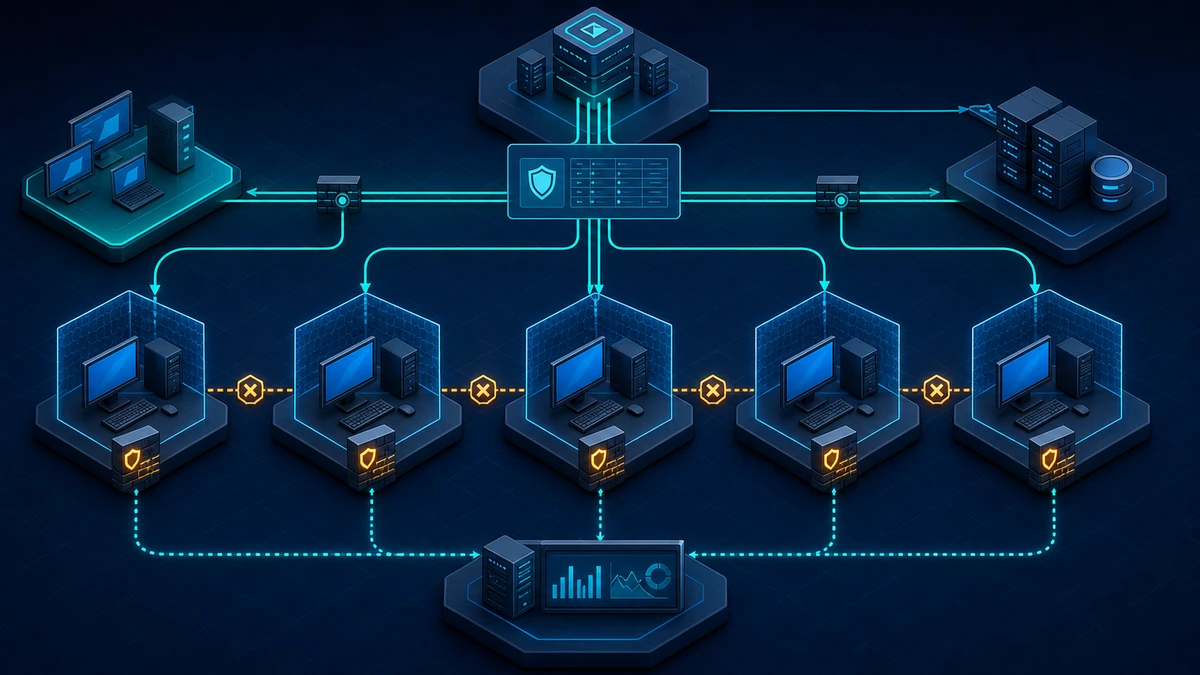
Starting point: domain membership does not require unrestricted client reachability
Many Active Directory environments still treat the internal client network as one trusted communication zone. Windows Defender Firewall may be enabled, yet broad built-in rule groups, locally created exceptions or legacy Group Policy Objects leave workstations reachable from large address ranges. In other estates the firewall was disabled years ago to avoid support cases and never returned to managed operation.
That reachability creates an unnecessary path between otherwise equivalent endpoints. A normal office client usually needs outbound access to DNS, domain services, update infrastructure, web proxies and business applications. It rarely needs unsolicited inbound SMB, RDP, RPC or remote-management traffic from every other client. If endpoint-to-endpoint access remains open, one affected workstation can expose the same administrative and file-sharing interfaces on many neighboring systems.
Network segmentation remains important, but it is not always granular enough. Several departments may share a VLAN, wireless clients may move between locations, and routing rules often distinguish servers from users rather than one user endpoint from another. The host firewall applies the boundary directly at the destination, including when two clients are in the same subnet and no central firewall sees the traffic.
The control must nevertheless be designed as more than “turn the firewall on.” A default block without required management paths can break support, software distribution or monitoring. An allow rule for the entire domain network largely preserves the original exposure. Conflicting GPO and MDM settings can produce different effective policies on nominally identical systems. A useful client-firewall baseline therefore combines declared traffic requirements, narrow rules, one authoritative management model, telemetry and a tested recovery path.
The protection boundary also needs to be explicit. Client firewalls reduce unsolicited network reachability and make lateral movement between endpoints harder. They do not remove compromised credentials, secure an allowed service, inspect all application content or replace EDR, patching, tiered administration and network segmentation. With the normal default of allowing outbound connections, they also do not provide a general egress-control boundary.
Target state: clients accept only justified inbound connections
A defensible target state has clear properties:
- The firewall is enabled for every profile. Domain, Private and Public profiles have deliberate settings; losing the Domain profile does not remove the control.
- Inbound connections are blocked by default. Exceptions exist only for documented services, device classes and source systems.
- Outbound connections remain allowed by default for the normal client fleet. A default outbound deny policy is handled as a separate high-security project with its own application and update inventory.
- Client-to-client administration is not generally permitted. RDP, SMB, WinRM, WMI and comparable management paths originate only from approved management systems where they are operationally required.
- Rules are scoped beyond a port number. Program or service, protocol, local port, remote address, profile and interface type are constrained where the use case permits it.
- Device classes receive separate policies. Standard office clients, privileged access workstations, developer devices, kiosks and specialist systems do not inherit one collection of broad exceptions.
- One control plane is authoritative for each device population. Group Policy and MDM responsibilities are documented, and unintended local rule merging is disabled.
- Exceptions have owners and expiry criteria. Every nonbaseline rule states the business dependency, source, destination, technical owner and review date.
- Blocked traffic and policy drift are visible centrally. Logging is sized, forwarded and reviewed without collecting unrestricted high-volume data indefinitely.
- Rollout and rollback are exercised. Representative pilot devices, remote users and recovery paths are tested before broad enforcement.
The objective is not to create as many firewall rules as possible. It is to make a client’s exposed network surface small, explainable and consistent with its actual role.
Implementation: build the policy from observed dependencies
1) Inventory the effective state and listening surface
Start with representative clients from each device class. Record the active profiles, default actions, rule sources, listening services and existing management dependencies. Do not rely only on the GPMC view: local rules, multiple GPOs, security software and MDM can change what the endpoint actually applies.
The following commands are read-only and provide a useful local snapshot:
Get-NetFirewallProfile -PolicyStore ActiveStore |
  Select-Object Name, Enabled, DefaultInboundAction, DefaultOutboundAction,
    AllowInboundRules, AllowLocalFirewallRules, AllowLocalIPsecRules,
    LogBlocked, LogAllowed, LogFileName, LogMaxSizeKilobytes

Get-NetFirewallRule -PolicyStore ActiveStore -Enabled True |
  Sort-Object DisplayGroup, DisplayName |
  Select-Object DisplayName, DisplayGroup, Direction, Action, Profile,
    PolicyStoreSourceType, PolicyStoreSource
Inspect port and address filters separately; a rule name alone does not prove its effective scope:
Get-NetFirewallRule -PolicyStore ActiveStore -Enabled True -Direction Inbound |
  Get-NetFirewallPortFilter |
  Select-Object InstanceID, Protocol, LocalPort, RemotePort

Get-NetFirewallRule -PolicyStore ActiveStore -Enabled True -Direction Inbound |
  Get-NetFirewallAddressFilter |
  Select-Object InstanceID, LocalAddress, RemoteAddress

Get-NetTCPConnection -State Listen |
  Sort-Object LocalPort |
  Select-Object LocalAddress, LocalPort, OwningProcess

Get-NetUDPEndpoint |
  Sort-Object LocalPort |
  Select-Object LocalAddress, LocalPort, OwningProcess
A listening port is not automatically a business requirement, and one snapshot misses short-lived processes. Correlate the results with service ownership, endpoint telemetry, software distribution, monitoring, help-desk procedures and network-flow data. Capture remote and VPN users as well as office devices because profile selection and management sources may differ outside the corporate LAN.
Build a simple dependency register for every required inbound flow: target device class, program or service, protocol and port, approved source addresses, applicable profile, purpose, owner and failure impact. Unknown traffic belongs in investigation, not in a broad temporary allow rule.
2) Separate baseline policy from role-specific exceptions
Use a dedicated computer GPO for the common client-firewall baseline. Apply additional narrowly scoped GPOs only to device classes that require inbound services. This keeps a printer-management exception or developer-tool rule from becoming part of every workstation’s effective surface.
The settings are located under:
Computer Configuration
  Policies
    Windows Settings
      Security Settings
        Windows Defender Firewall with Advanced Security
Configure the Domain, Private and Public profiles explicitly:
- firewall state: On,
- inbound connections: Block (default),
- outbound connections: Allow (default),
- logging: enabled and sized according to the collection design,
- local rule merging: disabled where policy is centrally authoritative.
Do not use “Block all connections” as the normal baseline. That setting also disregards inbound allow rules and is intended for exceptional isolation scenarios, not routine client hardening. Likewise, do not configure only the Domain profile. Network-category detection can be delayed or fail, and mobile devices regularly use Private or Public networks. The latter profiles should have no broader inbound permissions than the Domain profile.
Link the GPO to a pilot OU or use tightly controlled security filtering first. Avoid complex WMI filters for core enforcement unless the requirement cannot be represented through stable OUs or groups; slow or inconsistent policy targeting is a poor foundation for a security boundary.
3) Decide whether GPO, MDM or local policy owns each fleet
Hybrid-managed clients often receive firewall settings from more than one place. Group Policy, the Firewall configuration service provider, endpoint-security profiles and local administration can all contribute settings or rules. Their combination is not a safe substitute for an ownership model.
Define one authoritative control plane for each device population and document any deliberate coexistence. Before deployment, test precedence and rule-store behavior on an actually hybrid-joined pilot, not only on separate GPO and MDM test devices. Two consoles both showing a successful assignment do not prove that their intended settings form the effective policy.
For a centrally managed GPO fleet, set Apply local firewall rules to No for each relevant profile unless a documented operational case requires local exceptions. Assess Apply local connection security rules separately if IPsec is used. Disabling merge prevents a local administrator, installer or support tool from quietly widening inbound reachability after the central review. Existing local rules can remain stored on the endpoint but no longer contribute to the effective policy while merging is disabled.
This setting has an operational consequence: application installers that expect to add a local exception will no longer make their service reachable. Such an exception must be represented in the central policy and tested with the application owner. Do not re-enable unrestricted local merging merely to resolve one packaging defect.
4) Write rules around services and trusted sources
An inbound allow rule should be as specific as the dependency permits. Evaluate at least:
- program or Windows service: bind the rule to the intended executable or service instead of every process that can use the port;
- protocol and local port: specify the actual listener and avoid wide ranges unless the product requires and documents them;
- remote address: limit access to management servers, jump hosts, monitoring nodes or application servers rather than
Anyor the whole internal address space; - profile: select only the network profiles on which the service must be reachable;
- interface type: exclude wireless or remote-access interfaces when the workflow applies only to a managed LAN;
- edge traversal: leave it blocked unless the application has a reviewed requirement;
- rule owner and purpose: put a stable identifier in the rule description and the change record.
Remote IP scope is useful reduction, but it is not strong machine identity. Address reuse, NAT, compromised management systems and overly broad subnets remain relevant. Where the requirement needs authenticated computer or user identity, design IPsec connection-security rules as a separate workstream and test domain bootstrap, certificate or Kerberos dependencies carefully.
Do not enable an entire predefined rule group merely because one component is needed. File and Printer Sharing, Remote Service Management and network-discovery groups can contain several protocols and scopes. Enable or recreate only the required rules and narrow their sources. Prefer a program or service rule over a port-only rule when the product supports a stable path and servicing model.
For a normal client estate, peer workstations should not be valid sources for administrative protocols. Permit RDP or WinRM from dedicated administration systems if the support model needs them. Permit monitoring and software-distribution traffic only from their actual service nodes. Client SMB inbound should be absent unless the workstation has an approved file-sharing role. Dynamic RPC-based administration needs special care: opening a large port range to all clients is not an acceptable shortcut. Use a constrained management design or change the operating procedure.
5) Stage enforcement without pretending there is an audit mode
Windows Defender Firewall does not provide an AppLocker-style “audit only” mode that reliably reports every connection a future policy would block. A low-risk rollout therefore depends on inventory, representative lab tests and small enforcement rings rather than an indefinite audit switch.
A practical sequence is:
- document the current effective state and required inbound flows;
- build and back up the baseline and exception GPOs without broad links;
- validate rules on reference systems for each device class;
- apply the complete profile settings and required exceptions to the first pilot ring;
- review blocked traffic, service health and support cases;
- expand to IT and security users, then representative business groups;
- cover locations, VPN users and remote devices before broad release;
- treat specialist clients and privileged workstations as separate policy decisions.
Do not deploy a default block separately from the approved exceptions to devices that depend on inbound management. Profile defaults and required rules should become effective in the same controlled pilot change. Conversely, do not create a temporary allow from every internal subnet while “testing”; such a rule hides missing dependencies and defeats the test.
Each ring should include a normal patch, application-update, remote-support and VPN cycle. Test software installation, EDR response, vulnerability scanning, inventory, remote assistance and any wake-up or deployment mechanisms that the organization actually operates. Success on a freshly built office laptop alone is insufficient evidence.
6) Collect useful logs and control their volume
Configure Windows Firewall logging for each profile through Group Policy. Record dropped packets during pilot and operation. Logging successful connections can help establish a baseline for selected groups, but it produces considerably more data and should have a defined duration and purpose. Set an explicit file path and maximum size; the common local path is %SystemRoot%\System32\LogFiles\Firewall\pfirewall.log.
Local rotating text logs are troubleshooting evidence, not central monitoring. Forward or collect relevant data through the existing EDR, SIEM or endpoint-management platform and preserve device, profile, direction, addresses, protocol and port. Filtering Platform audit events can add connection-level visibility, but packet-drop and successful-connection auditing may be high volume. Pilot the audit policy and storage impact before enabling it broadly.
Use the data to answer concrete questions:
- Which required service is being blocked, on which device class and profile?
- Is the source an approved management system or another client?
- Are exceptions used after their original project has ended?
- Do devices report disabled profiles, local merge or unexpected rule sources?
- Did a policy change increase blocks or help-desk incidents?
A blocked packet is not automatically a reason for an allow rule. Internet background noise, discovery traffic, stale management jobs and unauthorized tools are expected to fail against the boundary. Validate the dependency and owner before changing policy.
7) Keep outbound allow as the normal client baseline
Default outbound allow is a deliberate scope decision for a typical Windows client fleet. It preserves operating-system updates, certificate checks, cloud services, browsers, collaboration tools and business applications while the project removes unnecessary inbound reachability. Targeted outbound block rules may still be appropriate for explicitly prohibited software or protocols, but they do not turn the host firewall into a complete egress-control system.
A default outbound deny posture is possible, but it is a different high-security project. It requires a reliable application inventory, service-specific destinations, proxy and update architecture, handling of dynamic cloud endpoints, DNS strategy, exception ownership and continuous regression testing. Port-based outbound allows such as TCP 443 to any destination provide little application-level restriction, while narrow address lists for frequently changing services become fragile.
Use default outbound deny only for device classes whose stable workload and operating model justify that cost, such as certain administrative or kiosk systems. Give those systems a separate GPO, pilot, rollback and support model. Do not quietly add outbound deny to the general client-hardening change: the resulting failures are harder to diagnose and the objective is no longer limited to lateral-movement exposure.
8) Test recovery and operate the rule set
Back up the relevant GPOs and export the effective firewall state before each production change. Keep a last-known-good baseline that can be reapplied through a higher-precedence recovery GPO or a controlled link change. Recovery should normally restore known profile settings and rules, not disable the Windows Firewall service. Disabling the service can affect platform integrations and removes the entire boundary.
Test rollback while the pilot device is on the corporate network and while it is remote. A device that cannot reach a Domain Controller will not receive an emergency GPO immediately. Ensure the endpoint-management or out-of-band path used for recovery is itself covered by the firewall policy and has been exercised, not merely documented.
After each policy refresh, compare the ActiveStore output with the approved baseline and perform functional tests from both permitted and nonpermitted source zones. Review exception usage and ownership periodically. Remove obsolete product rules, shrink temporary address ranges and investigate devices whose effective profile or rule source differs from the assigned design.
Firewall policy is part of application lifecycle management. New management agents, changed service accounts, cloud migrations and vendor updates can alter traffic requirements. The intake process for new software should therefore ask whether inbound reachability is needed, from where, on which profile and for how long. “The vendor requires the firewall to be disabled” is not a rule specification.
Advantages
- Reduces the client attack surface: services that do not need network exposure remain unreachable even when they are installed or listening.
- Limits peer-to-peer movement: one user workstation is no longer a generally trusted source for administrative access to another.
- Works inside a subnet: the destination host can enforce the boundary even when no routed network firewall sees the traffic.
- Uses established Windows management: Group Policy, OUs, security groups and existing endpoint telemetry can support staged deployment.
- Makes exceptions reviewable: program, service, source and profile scope produce more useful security decisions than a flat internal allow.
- Supports distinct device roles: privileged workstations and specialist clients can receive stricter or different policies without changing the whole network.
- Adds resilience to segmentation: host and network controls overlap, so one overly broad network route does not automatically expose every client service.
Disadvantages and limits
- Dependency discovery requires effort: legacy management, dynamic RPC and poorly documented applications can fail when broad reachability is removed.
- Remote support can become harder: an incomplete rule or unavailable management path may delay recovery, especially for off-network devices.
- IP addresses are not identities: source scoping reduces exposure but does not by itself authenticate the calling system.
- Allowed services still need hardening: the firewall cannot correct weak authorization, vulnerable software or excessive privileges behind an approved rule.
- Compromised management systems remain powerful: a trusted jump host or deployment server can reach every endpoint in its assigned scope.
- Default outbound allow does not contain egress: malware on a client may still initiate connections; separate proxy, EDR and network controls remain necessary.
- Hybrid policy can be complex: GPO, MDM, local rules and security products may interact differently across device populations.
- Logging has capacity costs: detailed Filtering Platform and allowed-connection events can overwhelm local storage and central collection without tuning.
- The control does not replace segmentation: client firewalls complement VLANs, access controls and administrative tiers but should not become the only boundary.
Common project pitfalls
- Disabling the firewall service: this removes the control and can disrupt Windows components; manage profiles and rules through supported policy instead.
- Configuring only the Domain profile: mobile or misclassified devices then fall back to a weaker Private or Public policy.
- Allowing the entire internal network: a broad remote-address scope preserves client-to-client reachability and defeats the main objective.
- Enabling whole predefined rule groups: bundled rules often expose more services, protocols and profiles than the approved workflow needs.
- Using port-only rules: any process able to bind the permitted port may inherit reachability when a program or service condition was possible.
- Leaving local rule merge enabled unintentionally: installers and local administrators can widen the centrally reviewed policy.
- Letting GPO and MDM both “own” the setting: successful assignments can still produce an unexpected effective state on hybrid-managed clients.
- Treating blocked traffic as approved demand: scans, discovery and stale jobs should remain blocked unless an owner proves a requirement.
- Opening dynamic RPC broadly: operational convenience turns into a large inbound surface when sources and services are not constrained.
- Testing only office LAN devices: VPN, wireless, remote and newly provisioned clients may use another profile or management path.
- Changing defaults before exceptions are ready: support and deployment services can be lost during the gap between policy changes.
- Skipping negative tests: proving that approved management works does not prove that peer clients are denied.
- Using the firewall as the only control: credential hygiene, service hardening, EDR, patching and tiered administration remain necessary.
- Combining outbound deny with the first rollout: two different projects then create failures that are difficult to attribute and recover.
- Having no tested rollback for offline devices: an emergency GPO helps only after the affected endpoint can retrieve it.
Project checklist
- [ ] Define standard clients, privileged workstations, developer devices, kiosks and specialist groups separately.
- [ ] Assign a policy owner, service owners and an approval process for exceptions.
- [ ] Inventory active profiles, default actions, rule sources and local rule-merge settings.
- [ ] Record listening TCP and UDP endpoints on representative systems.
- [ ] Document required inbound flows with program, service, port, source, profile and business purpose.
- [ ] Identify remote-support, monitoring, software-distribution, vulnerability-scanning and EDR dependencies.
- [ ] Select one authoritative management plane for each GPO- or MDM-managed device population.
- [ ] Test effective precedence on hybrid-managed pilot devices.
- [ ] Create and back up a dedicated client-firewall baseline GPO.
- [ ] Enable the firewall explicitly for Domain, Private and Public profiles.
- [ ] Set default inbound to block and default outbound to allow for the normal client fleet.
- [ ] Disable local firewall-rule merging where central policy is authoritative.
- [ ] Assess local connection-security rule merging separately if IPsec is used.
- [ ] Separate common baseline settings from role-specific exception GPOs.
- [ ] Scope inbound allows to the intended program or service, protocol, port and remote sources.
- [ ] Remove broad client-to-client RDP, SMB and remote-management permissions.
- [ ] Review predefined rule groups and enable only the required individual rules.
- [ ] Configure blocked-traffic logging, file size, retention and central collection.
- [ ] Pilot Filtering Platform audit events before broad collection.
- [ ] Deploy to reference systems and small enforcement rings before broad linking.
- [ ] Test permitted management from approved source zones.
- [ ] Test that equivalent access from normal client networks is denied.
- [ ] Include VPN, wireless, remote and newly provisioned devices in the pilot.
- [ ] Observe at least one patch, application-update and remote-support cycle.
- [ ] Prepare a last-known-good GPO and test rollback without disabling the firewall service.
- [ ] Verify how offline devices regain a management path and retrieve corrected policy.
- [ ] Review the effective ActiveStore after policy refresh and investigate drift.
- [ ] Give every exception an owner, justification and review or expiry date.
- [ ] Treat default outbound deny as a separate high-security project with its own inventory and rollback.
- [ ] Review client firewalls together with segmentation, EDR, patching and tiered administration.