
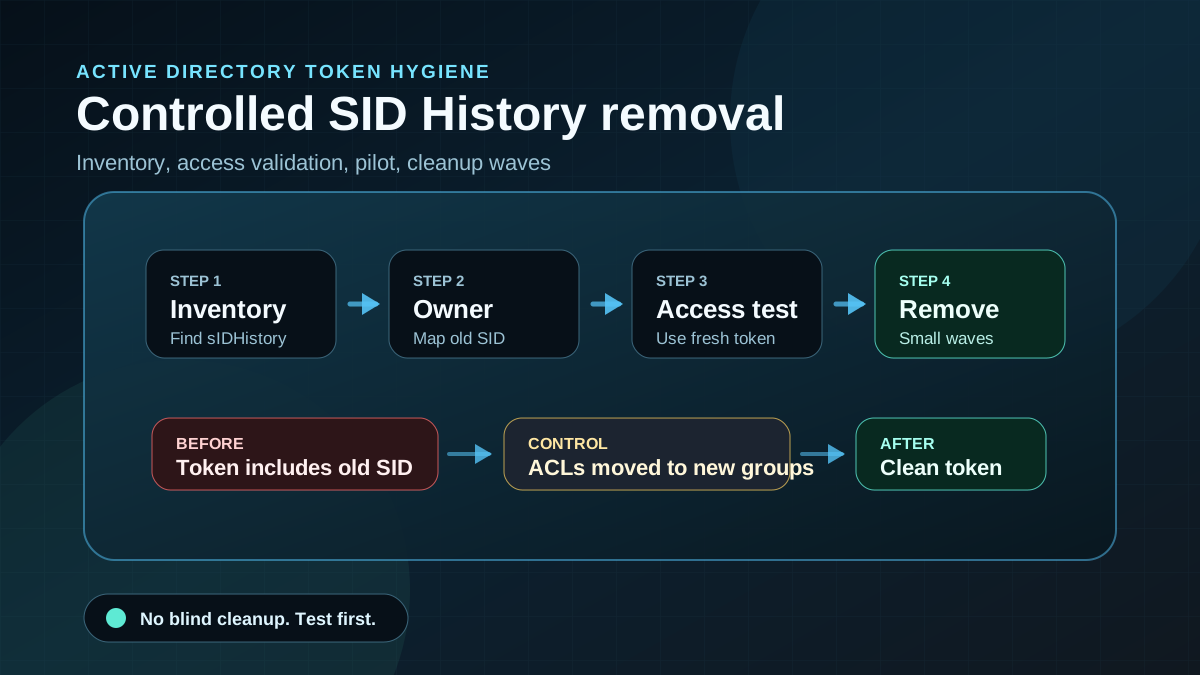
Starting point: old SIDs remain in the token
sIDHistory is not an Active Directory bug. The attribute exists for migration scenarios: a user, group or computer receives a new SID after migration, but keeps old SIDs in the token so access to not-yet-migrated resources continues to work. During a controlled domain or forest migration, that can be practical and sometimes necessary.
The problem starts after the migration. Old file servers, application ACLs, share permissions and group models are not cleaned up consistently. Years later, old SIDs still sit on production accounts even though the source domain has been decommissioned or nobody knows which resource supposedly still needs those SIDs. At that point, sIDHistory becomes a barely visible authorization anchor.
From a security perspective this matters because Windows access checks do not look only at the current object SID. SIDs from sIDHistory can still grant access. This becomes especially sensitive for privileged accounts, old trust relationships, historic migrations with broad permissions and environments where authorization models are not documented centrally.
The goal is not to delete sIDHistory blindly. The goal is to make migration leftovers visible, replace required transition access with native permissions and remove old SIDs from tokens in a controlled way.
Target state: SID History is an exception, not normal operations
A strong target state has specific properties:
- All objects with
sIDHistoryare known. Users, groups and computers are reviewed, not just sampled. - Every SID has a documented purpose. Owner, migration context, affected resources and expiration date are clear.
- Privileged objects are prioritized. Admins, service accounts, Tier-0-related groups and old migration groups are assessed first.
- Required access is re-permissioned natively. Old SIDs are not kept just because nobody wants to touch ACLs.
- Removal happens in waves. Pilot first, then business area, then broader cleanup.
- Trusts and SID filtering are reviewed. External or forest trusts are not treated as silent compensating controls.
- Rollback is planned. Previous values, change window, tests and fallback path are documented.
The target is simple: after a completed migration, normal production objects should not need permanent SID History. Where it is still needed, it is a documented exception with an end date.
Implementation: prove first, then remove
1) Capture inventory in read-only mode
Start with a broad read-only query. Checking only users is not enough. Groups and computers can also be affected.
Import-Module ActiveDirectory

Get-ADObject `
  -LDAPFilter '(sIDHistory=*)' `
  -Properties sIDHistory,objectClass,sAMAccountName,distinguishedName |
  Select-Object `
    objectClass,
    name,
    sAMAccountName,
    distinguishedName,
    @{Name = 'SIDHistory'; Expression = {
      ($_.sIDHistory | ForEach-Object { $_.Value }) -join ';'
    }}
Do not place this output in an unprotected share. It contains identity and authorization information. Store it in a restricted project location and treat it like other AD audit data.
A SID-prefix view helps with prioritization. The domain SID portion shows which old domain the SID probably came from:
Get-ADObject `
  -LDAPFilter '(sIDHistory=*)' `
  -Properties sIDHistory,objectClass,sAMAccountName |
  ForEach-Object {
    $object = $_
    foreach ($sid in $object.sIDHistory) {
      [pscustomobject]@{
        ObjectClass       = $object.objectClass
        Name              = $object.Name
        SamAccountName    = $object.sAMAccountName
        DistinguishedName = $object.DistinguishedName
        SIDHistory        = $sid.Value
        SourceDomainSid   = ($sid.Value -replace '-\d+$', '')
      }
    }
  }
2) Prioritize risk, not volume
Many findings do not automatically mean high risk. One privileged account with an old SID can matter more than hundreds of normal users from an old migration. Prioritize:
- Domain Admins, Enterprise Admins and delegated admin groups,
- service accounts running on servers, tasks, IIS, SQL, backup or middleware,
- groups broadly permissioned on file servers or applications,
- accounts with Tier-0 access or admin logon to management systems,
- disabled but still permissioned legacy objects,
- objects with multiple old SIDs from multiple migrations.
Start where old SIDs can grant privileged or hard-to-explain access. Alphabetical cleanup creates work, but not necessarily risk reduction.
3) Clarify migration context and trusts
Before removal, understand why the SID exists. Ask for every SID prefix:
- Which old domain or forest did this SID prefix come from?
- Does the source still exist?
- Are trusts, external resources or archive systems still present?
- Has SID filtering on trusts been assessed?
- Are old file servers, NAS systems, SharePoint farms or applications still permissioned with old SIDs?
- Are migration waves still running that need SID History?
If the old domain has already been shut down and no resource can evaluate that SID anymore, that is a strong cleanup signal. If the source is still alive, removal needs a tighter test plan.
4) Do not assess access by intuition
The most common mistake is technical removal without business access testing. Build a small matrix per object group:
- object or group with
sIDHistory, - old SID and likely source,
- known resources with old ACLs,
- business owner,
- required target permission without SID History,
- test account or test group,
- test date and result,
- decision: remove, migrate, keep temporarily.
For file servers, the target direction is usually clear: remove old SID ACEs from ACLs and grant access through current groups or roles. Applications need more caution because permissions can live in databases, role models or local configuration files.
5) Choose a low-blast-radius pilot
Do not start with Domain Admins and do not start with a large business group. A useful pilot has:
- few objects,
- clear owner,
- known resources,
- reproducible access tests,
- short change window,
- documented previous values,
- fast fallback path.
For the before-state, a controlled CSV export with distinguished name and SID values is enough at the beginning. It does not replace an AD backup. It makes removed values traceable so they can be assessed if a rollback discussion becomes necessary.
6) Prepare targeted removal with preview
Do not remove all values from all objects in one sweep. Work per object and per SID, or per reviewed wave. For users, a defensive start looks like this:
$account = 'CN=Example User,OU=Users,DC=corp,DC=example'
$sidToRemove = 'S-1-5-21-0000000000-0000000000-0000000000-12345'

Set-ADUser `
  -Identity $account `
  -Remove @{ SIDHistory = $sidToRemove } `
  -WhatIf
For groups or computers, use Set-ADGroup or Set-ADComputer accordingly. The workflow matters: identify first, establish access tests, run -WhatIf, obtain change approval, then remove in production with a small scope.
After removal, the user needs a new logon token. Existing sessions can keep old tokens until the user signs in again or relevant tickets expire. Include that in testing and change communication.
7) Add evidence and monitoring
After every wave, run three checks:
Get-ADObject `
  -LDAPFilter '(sIDHistory=*)' `
  -SearchBase 'OU=Pilot,DC=corp,DC=example' `
  -Properties sIDHistory |
  Select-Object name,objectClass,sIDHistory
Also review business access, helpdesk tickets, authentication events and application logs. An empty attribute is only good if required access now works through current groups.
For ongoing operations, sIDHistory should become part of regular AD health checks. New findings after migration completion require an explanation.
8) Build it into the migration process
SID History cleanup is not a one-time hygiene task. It belongs into the closure phase of every domain and forest migration:
- Plan migration with a limited SID History purpose.
- Move old ACLs to new groups in parallel.
- Test application and file server access.
- Remove
sIDHistoryper wave. - Assess trusts and SID filtering separately.
- Produce a closure report with remaining objects, exceptions and end dates.
If these steps happen years after the migration, cleanup is much harder. It is still worth doing because it removes old, barely visible authorization paths from AD tokens.
Advantages
- Fewer quiet authorization anchors: old SIDs no longer grant access unnoticed.
- Clearer access evaluation: permissions move back to current groups, roles and resources.
- Better token hygiene: tokens become smaller and easier to reason about.
- Strong signal for completed migrations: a migration is not finished while old authorization anchors remain.
- Better auditability: owner, source, purpose and removal are documented.
- Reduced trust dependency: historic forest or domain relationships become less important for daily operations.
Disadvantages and limits
- Analysis effort is significant: without resource inventory and owners, removal is risky.
- Legacy applications can break: some systems still evaluate old SIDs or local role models.
- Sessions do not refresh immediately: existing logons can keep old tokens until renewed.
- Not a replacement for ACL cleanup: if resources keep old SIDs in ACLs, the authorization model remains messy.
- Trust security is separate work: SID History cleanup does not replace assessment of trusts, SID filtering and admin boundaries.
- Rollback is not only technical: even when values are documented, the business reason for restoring them must be clear.
Typical pitfalls
- Checking only users: groups and computers can also carry
sIDHistory. - Deleting globally: broad removal without a pilot creates avoidable operations risk.
- Leaving privileged groups for later: this is where the security benefit is highest.
- Testing with old sessions: access tests with stale tokens create false confidence.
- Leaving old ACLs untouched: SID History may disappear, but the technical debt on resources remains.
- Ignoring trusts: external and forest trusts influence how risky old SIDs can still be.
- Not time-boxing exceptions: permanent exception objects quickly become normal operations again.
- Not adding cleanup to migration closure: the same issue returns during the next migration.
Project checklist
- [ ] Inventory all AD objects with
sIDHistoryusing an LDAP filter. - [ ] Map SID prefixes to old domains, forests or migration waves.
- [ ] Prioritize privileged users, groups, service accounts and computers.
- [ ] Assess trusts, SID filtering and still-active legacy resources.
- [ ] Document owners and required target permissions per object group.
- [ ] Identify old ACLs on file servers, applications and special platforms.
- [ ] Select a pilot group with low blast radius.
- [ ] Store before-values in a restricted location and define a change window.
- [ ] Prepare removal with
-WhatIfand execute per object or wave. - [ ] Test new logons, Kerberos tickets and business access.
- [ ] Track remaining objects and exceptions with expiration dates.
- [ ] Add SID History checks to AD health checks and migration closure.