
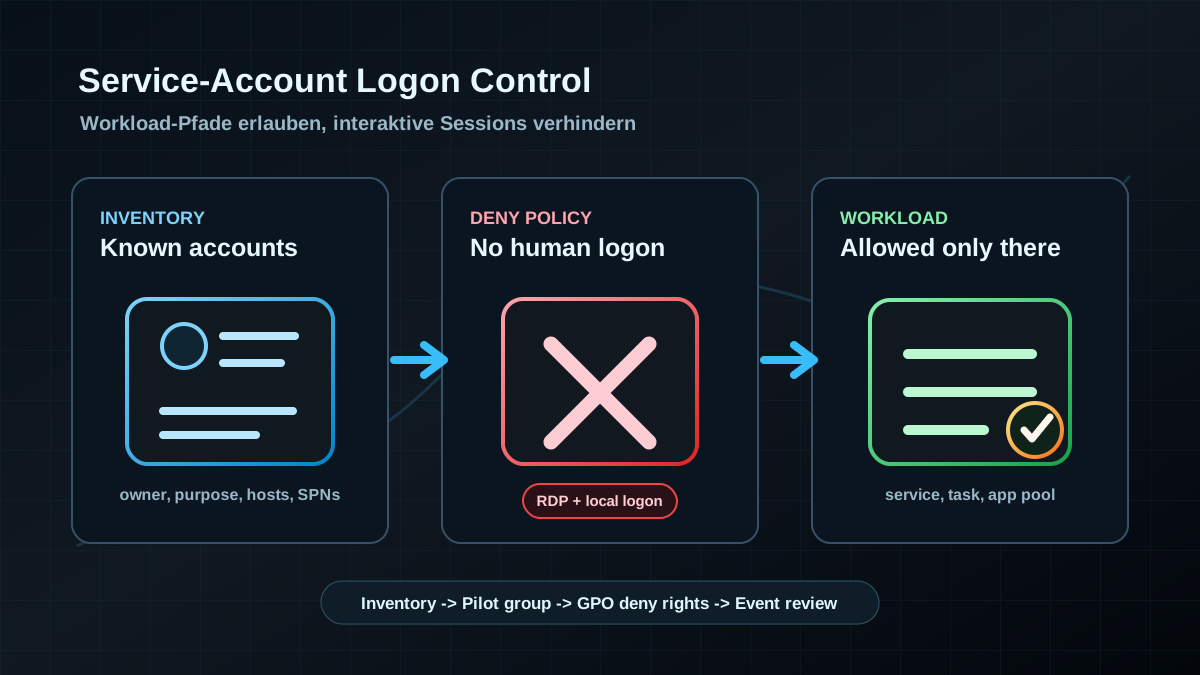
Starting point: technical accounts become substitute users
In many Active Directory environments, service accounts started with a clear purpose: Windows service, scheduled task, IIS application pool, database access, backup agent, monitoring, or integration account. Years later, some of those accounts are no longer just workload identities. Their passwords are known, they run on several servers, administrators use them for tests, and they can sign in interactively.
That creates an unnecessarily wide risk path. A service account often has more access than a normal user but fewer protections than an admin account: no MFA, rare password rotation, unclear ownership, long lifetime, and a high tolerance for exceptions. If that account can sign in through RDP, locally at the console, or as a normal interactive Windows session, it leaves credential traces, weakens accountability, and creates an easy misuse path.
The goal is not to block every technical account blindly and damage operations. The goal is clean separation: service accounts may use the logon types their workloads require. Human interaction, RDP, and local sign-in are usually not part of that requirement.
Target state: workload identities without human logon
A clean target state has several concrete properties:
- Service accounts are inventoried and owned. Nobody has to guess which application or team depends on an account.
- Interactive logon is blocked. Service accounts cannot sign in locally, through RDP, or as normal user sessions.
- Service and batch rights are assigned narrowly.
Log on as a serviceandLog on as a batch jobexist only where the workload needs them. - Deny rights are used deliberately.
Deny log on locallyandDeny log on through Remote Desktop Servicesare applied with test groups, clear scope, and rollback. - Privileged service accounts are reduced. Where possible, classic user-based service accounts move to gMSA.
- Logon attempts are monitored. An interactive logon attempt by a service account is not normal operational noise.
Important detail: deny rights override allow rights. That is useful for security, but operationally risky if groups are populated too broadly. This is why rollout should happen in waves.
Implementation: make it visible, then block it
1) Build a realistic service-account inventory
Do not start with a GPO. Start with a list. There is rarely a perfect source, so combine several signals:
- accounts with SPNs,
- accounts with
PasswordNeverExpires, - accounts in service, SQL, IIS, backup, monitoring, or application groups,
- documented accounts from CMDB, PAM, password vault, and application teams,
- accounts configured in services, tasks, or application pools,
- accounts with old passwords or very old last logon data.
A read-only AD query for an initial SPN view:
Import-Module ActiveDirectory

Get-ADUser -LDAPFilter '(servicePrincipalName=*)' `
  -Properties ServicePrincipalName,Enabled,PasswordNeverExpires,PasswordLastSet,LastLogonDate,Description |
  Select-Object SamAccountName,Enabled,PasswordNeverExpires,PasswordLastSet,LastLogonDate,Description,ServicePrincipalName
This is not a complete service-account inventory. Accounts for scheduled tasks, local services, or third-party products do not always have SPNs. The query is only a solid starting point.
2) Look for interactive use before the change
Before blocking anything, confirm whether an account is used interactively today. The most relevant Windows signals are Security events on servers and domain controllers:
4624successful logon,4625failed logon,- Logon Type
2for local/interactive, - Logon Type
10for RemoteInteractive/RDP, - Logon Type
11for CachedInteractive, 4648for logon with explicit credentials.
If a service account regularly generates Logon Type 10, this is not only a GPO issue. It is an operations question: who uses the account, why, from which system, and what is the replacement workflow? Block only after that is understood.
3) Keep the group model small and explicit
A practical pattern is a dedicated security group, for example:
GG-Deny-ServiceAccounts-InteractiveLogon- optionally split by tier or environment, such as
GG-T0-Deny-ServiceAccounts-InteractiveLogon
This group contains only classic user-based service accounts that should be denied interactive sign-in. No normal users, no admin accounts, no break-glass accounts, and no ownerless nested groups.
The group is then applied through GPO to the relevant server and workstation OUs. Domain controllers need a separate assessment and a separate, tightly controlled policy. Tier-0 systems should be tested first with a small number of well-understood accounts.
4) Set User Rights Assignment through GPO
The relevant settings are under:
Computer Configuration
  Windows Settings
    Security Settings
      Local Policies
        User Rights Assignment
For service accounts, the key settings are:
- Deny log on locally (
SeDenyInteractiveLogonRight) - Deny log on through Remote Desktop Services (
SeDenyRemoteInteractiveLogonRight)
These two rights block the common human logon paths. They should point to the deny group.
Do not set these broadly:
- Deny log on as a service: this would break the services service accounts exist for.
- Deny log on as a batch job: this can break scheduled tasks or job systems.
- Deny access to this computer from the network: this can break file shares, application access, and remote management.
In parallel, review where Log on as a service and Log on as a batch job are currently assigned too broadly. That is a separate step and should not be mixed into the initial deny rollout.
5) Roll out in waves
A clean rollout usually looks like this:
- Build a pilot group with a few known service accounts.
- Link the GPO to a small server group with clear owners.
- Wait for
gpupdateor the normal GPO refresh. - Test services, tasks, application pools, and application functions.
- Review Security events for blocked interactive logons.
- Expand to additional OUs and account groups.
The important point: a blocked interactive logon is often a useful finding. Operations still needs a fast answer. Is it a legitimate legacy workflow, administrator misuse, an incorrectly documented service, or a suspicious event?
6) Review gMSA and password discipline in parallel
Blocking interactive sign-in is not a complete service-account strategy. It reduces one specific misuse path. In parallel, especially critical accounts should be reviewed for gMSA suitability, password rotation, minimal group membership, and SPN ownership.
gMSA is not suitable for every third-party application, but it is much cleaner for many Windows-adjacent workloads: no manually known password, automatic rotation, and better binding to authorized hosts. Where gMSA is not possible, the classic account still needs owner, purpose, allowed hosts, password rotation, and logon restrictions.
Advantages
- Fewer credential traces: Service-account passwords are less likely to land in interactive sessions, RDP profiles, or administrator workflows.
- Clearer accountability: Technical accounts are treated as workload identities again, not shared users.
- Better signals: Interactive logon attempts by service accounts become visible and actionable.
- Low technical entry cost: The required User Rights Assignments already exist in Windows and GPO.
- Fits tiering and gMSA: The control complements existing AD hardening instead of replacing it.
- Reduces old admin habits: Testing and emergency access must use proper admin or break-glass processes.
Disadvantages and limits
- Misconfiguration can disrupt operations: Overbroad deny groups or wrongly linked GPOs can block legitimate workflows.
- Not every logon type is solved: Services, batch jobs, and network access need separate rights and host restrictions.
- Legacy applications need analysis: Some products misuse technical accounts for maintenance, consoles, or remote actions.
- Deny is hard: If an account lands in the deny group, that setting overrides permissive rights.
- gMSA is not always immediately possible: Third-party products, appliances, or old platforms may not support it.
- Monitoring remains necessary: A GPO does not prevent new service accounts from being created incorrectly later.
Typical pitfalls
- Dropping all service accounts into one group: Without owners and tests, this becomes a blind change.
- Linking deny rights to the wrong OUs: A good setting at the wrong scope can cause an outage.
- Confusing batch, service, and interactive logon: Blocking interactive logon is not the same as removing
Log on as a service. - Treating domain controllers like member servers: DCs need a separate Tier-0 policy and careful test coverage.
- Catching break-glass accounts: Emergency accounts do not belong in broad deny groups.
- Not reading events after rollout: Legitimate breakage and suspicious attempts both remain invisible.
- Allowing new accounts without process: Service-account hardening fails quickly if provisioning and review are not updated.
Project checklist
- [ ] Combine service-account sources from AD, CMDB, PAM, password vault, GPOs, and application teams.
- [ ] Document owner, purpose, allowed hosts, SPNs, password age, and group memberships.
- [ ] Review Security events for Logon Types
2,10,11, and4648for service accounts. - [ ] Create a pilot group for
Deny log on locallyandDeny log on through Remote Desktop Services. - [ ] Start with a small GPO scope and handle DCs/Tier 0 separately.
- [ ] Test services, tasks, application pools, and applications after GPO refresh.
- [ ] Treat blocked interactive logons as SIEM or event-log signals.
- [ ] Review gMSA suitability for critical or broadly used accounts.
- [ ] Time-box exceptions and document owner, reason, and expiry date.
- [ ] Update the provisioning rule for new service accounts: no interactive logon without an approved exception.