
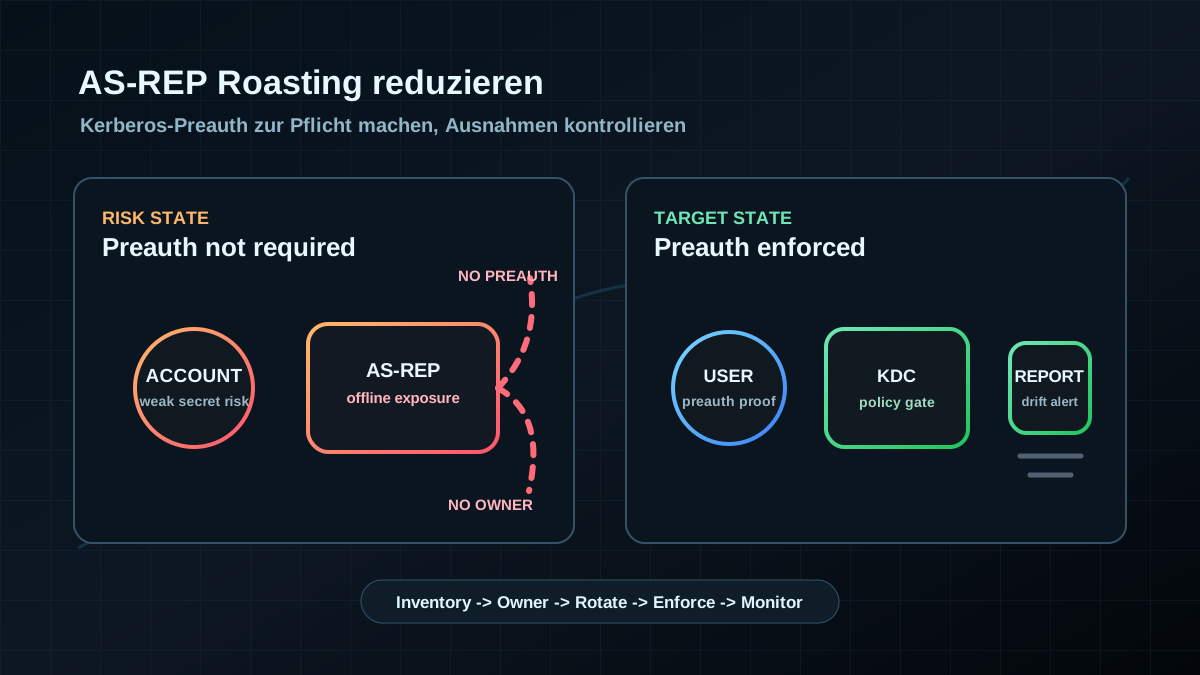
Starting point: an old account switch makes passwords attackable offline
AS-REP Roasting in Active Directory is often not caused by an exotic defect. It usually starts with a historical account setting: "Do not require Kerberos preauthentication". When that option is enabled, a Kerberos Authentication Service Response can be requested for the account without a prior pre-authentication proof. The risky part is not the online request itself, but the later offline testing against weak passwords.
In real environments, this often appears on old service accounts, migration accounts, test users, or poorly documented application accounts. Sometimes the option was set years ago because a legacy application failed otherwise. Sometimes it is simply an administration mistake. Both cases matter because one weak password can turn an ordinary user account into a serious AD risk path.
Common signals:
- user accounts with
DONT_REQ_PREAUTH, - old service accounts without an owner,
- accounts with SPNs, long-lived passwords, and unclear usage,
- passwords that have never been rotated,
- no alerting for Kerberos pre-authentication exceptions.
Handling this cleanly is not an exploit exercise. It is account hygiene, Kerberos baseline work, and controlled exception management.
Target state: pre-authentication is standard, exceptions are rare
A useful target state is concrete:
- Kerberos pre-authentication is required for all normal user and service accounts.
- All accounts without pre-authentication are inventoried, with owner, purpose, technical dependency, and expiry date.
- Service accounts use strong, rotated secrets or move to gMSA where the application model supports it.
- Legacy exceptions are time-bound and have a migration plan.
- Changes to the pre-authentication flag are monitored, so new exceptions do not appear silently.
The goal is not to break old applications blindly. The goal is to restore the secure default and treat exceptions as real risks.
Implementation: read first, harden in small waves
1) Find accounts without pre-authentication in read-only mode
Start with inventory only. The following query does not change anything and returns accounts where Kerberos pre-authentication is not required:
Import-Module ActiveDirectory

Get-ADUser -LDAPFilter '(&(objectCategory=person)(objectClass=user)(userAccountControl:1.2.840.113556.1.4.803:=4194304))' `
  -Properties Enabled,ServicePrincipalName,PasswordLastSet,LastLogonDate,Description,DistinguishedName |
  Select-Object SamAccountName,Enabled,PasswordLastSet,LastLogonDate,ServicePrincipalName,Description,DistinguishedName
Treat the result as a risk inventory, not as an automatic change list. Service accounts in particular need an owner, a test case, and a maintenance window before changes are made.
2) Classify each finding
Each finding should get a simple decision:
- remove: the account is disabled, orphaned, or no longer needed,
- harden: pre-authentication can be enabled, the password is rotated, and usage is tested,
- migrate: the service account moves to gMSA or a cleaner operating model,
- temporarily accept: legacy dependency with owner, risk, expiry date, and review date.
The key question is not "Why is the flag there?", but: What would break if it was not there? If no one can answer that, you already have a finding.
3) Pair pre-authentication with password and service-account hygiene
Requiring pre-authentication reduces attack surface. It does not automatically fix weak or stale passwords.
Practical minimum controls:
- Prioritize service accounts with long password ages.
- Review accounts with SPNs separately, because they often also matter for Kerberoasting.
- Restrict interactive sign-in for service accounts.
- Remove local logon, RDP, and unnecessary group memberships.
- Use gMSA where possible instead of manual password rotation on paper.
If an account previously ran without pre-authentication and had a weak password, rotating the password after the change is mandatory. Otherwise, historical risk remains unresolved.
4) Re-enable pre-authentication deliberately
For normal user accounts, the change is usually low-risk. For service accounts, use small waves.
Set-ADAccountControl -Identity "svc-example" -DoesNotRequirePreAuth $falseBefore the change, document owner, test case, and rollback. After the change, monitor the application, scheduled tasks, services, and Kerberos failure patterns for a defined observation window.
Avoid a bulk change across all findings without application owners. It may save an hour of analysis and cost an operational weekend when something breaks.
5) Prevent new exceptions
After cleanup, the technical change is only half the work. The environment needs a process that makes new pre-authentication exceptions visible:
- recurring report of accounts with
DONT_REQ_PREAUTH, - alerting when the relevant account attribute changes,
- review of new service accounts before production use,
- clear rule: pre-authentication exception only with owner, ticket, accepted risk, and expiry date,
- regular comparison against the documented exception list.
That keeps AS-REP exposure a controlled exception instead of a silently growing backlog.
Advantages
- Small technical change with strong baseline value: The insecure default is corrected for affected accounts.
- Reduces offline risk for weak passwords: Pre-authentication prevents affected accounts from falling into this attack path as easily.
- Improves service-account discipline: Owners, SPNs, password rotation, and logon rights become visible.
- Easy to measure: Affected accounts, closed exceptions, and new drift can be reported cleanly.
- Fits Kerberos hardening: It complements AES-only, Kerberos Armoring, gMSA, and tiering.
Disadvantages and limits
- Legacy applications can be affected when they truly depended on accounts without pre-authentication.
- Pre-authentication does not replace strong passwords: Weak service-account passwords remain a risk even when this path is reduced.
- gMSA is not always immediately possible: Old software, cluster setups, or appliances can make migration harder.
- The finding looks unspectacular: Business teams see no direct feature gain even though the risk is real.
- One-time cleanup is not enough: Without monitoring, new exceptions reappear through operations, migrations, or misconfiguration.
Typical pitfalls
- Ignoring disabled accounts: Disabled findings still deserve review and cleanup because they often reveal orphaned processes.
- Changing service accounts without owners: The technical change is small; the operational dependency may not be.
- Forgetting password rotation: After removing the flag, rotate passwords for affected active accounts.
- Reviewing SPN accounts in isolation: Accounts without pre-authentication and with SPNs need broader Kerberos risk review.
- Allowing exceptions without expiry: Otherwise the exception becomes the baseline again.
- Skipping drift detection: New accounts with disabled pre-authentication otherwise remain unknown until the next assessment.
Project checklist
- [ ] Inventory accounts with disabled Kerberos pre-authentication in read-only mode.
- [ ] Capture enabled state, service-account role, SPNs, password age, and last usage.
- [ ] Document owner, application, test case, and target state for every active finding.
- [ ] Move normal user accounts to mandatory pre-authentication first.
- [ ] Harden service accounts in small waves with change window, monitoring, and rollback.
- [ ] Rotate passwords for affected active accounts.
- [ ] Check whether service accounts can move to gMSA.
- [ ] Restrict interactive sign-in, RDP, local logon, and unnecessary group rights for service accounts.
- [ ] Document time-bound exceptions with expiry date, accepted risk, and review date.
- [ ] Establish recurring reporting and alerting for new pre-authentication exceptions.