
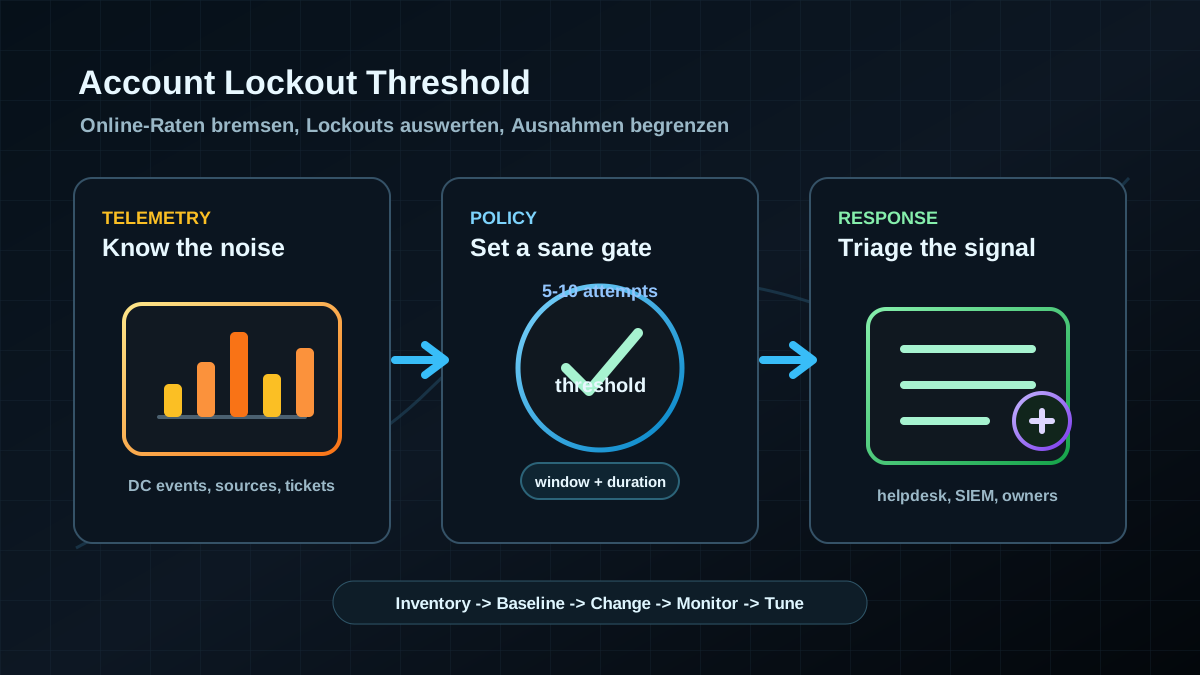
Starting point: without a threshold, online guessing stays too cheap
In many Active Directory environments, the Account Lockout Threshold is historical rather than designed. Sometimes it is set to 0 so nobody gets locked out by forgotten passwords or old services. Sometimes it is extremely low because "three attempts" sounds clean. Neither is usually a good target state.
A disabled lockout makes online guessing against domain accounts unnecessarily cheap. An overly aggressive lockout can disrupt helpdesk, admins, and production applications. The risk becomes worse when old services, scheduled tasks, mobile clients, or saved credentials keep submitting stale passwords. At that point the environment gets a lockout storm, not a useful security signal.
The threshold is therefore not an isolated checkbox. It depends on:
- the Default Domain Password Policy,
- Fine-Grained Password Policies for defined groups,
- authentication paths such as VPN, RDP, IIS, ADFS, Entra Connect, legacy applications, and file services,
- monitoring on domain controllers and in the SIEM,
- helpdesk processes for locked accounts,
- service-account hygiene and password rotation.
The expectation also needs to be realistic: account lockout does not fix weak password design and does not replace MFA on externally reachable access paths. It limits online attempts, creates useful signals, and forces old misconfigurations into view.
Target state: a measurable limit with controlled exceptions
A useful target state is not "set everything to three attempts and hope." It is more specific:
- Domain accounts have an effective lockout threshold.
0is not an acceptable long-term setting for normal user accounts. - Threshold, observation window, and lockout duration fit together. A common starting range is 5 to 10 failed attempts with a short observation and lockout window. The final value should come from operational data.
- Fine-Grained Password Policies are documented. Nobody should have to guess which policy applies to admins, privileged roles, or exception groups.
- Service accounts are not hidden behind broad exceptions. Stale credentials, manual passwords, and interactive use are cleaned up or moved to gMSA.
- Lockouts are monitored and triaged. A locked account is both an operational event and a security signal.
- External access paths have additional controls. VPN, RDP gateways, ADFS, Entra ID, and published web services need their own protections such as MFA, rate limits, and Conditional Access.
The goal is a threshold that slows and exposes attacks without turning the domain into a denial-of-service tool against itself.
Implementation: policies, telemetry, then the change
1) Capture effective policies in read-only mode
Start with inventory. The following queries do not change anything:
Import-Module ActiveDirectory

Get-ADDefaultDomainPasswordPolicy |
  Select-Object LockoutThreshold,LockoutObservationWindow,LockoutDuration,ComplexityEnabled,MinPasswordLength

Get-ADFineGrainedPasswordPolicy -Filter * |
  Select-Object Name,Precedence,LockoutThreshold,LockoutObservationWindow,LockoutDuration,AppliesTo
For spot checks, inspect the policy that actually applies to selected accounts:
Get-ADUserResultantPasswordPolicy -Identity "alice"If you find several Fine-Grained Password Policies with unclear scope, that is a prerequisite task: clean up policy ownership before changing thresholds.
2) Collect lockout and failed-logon data before the change
Before changing the policy, review at least one or two normal business cycles. Useful signals include:
- account lockout events on domain controllers,
- failed logons by account, source, and authentication type,
- repeated lockouts for the same accounts,
- source systems with many failed attempts,
- service accounts attempting interactive or remote logons,
- helpdesk tickets related to password issues.
The data determines whether a lower threshold is realistic or whether old clients, services, and saved credentials must be cleaned up first. Without this telemetry, the change is guesswork.
3) Define a baseline that operations can tolerate
A practical starting point is often not three failed attempts. Three can be appropriate for privileged, tightly controlled accounts, but it is often too sensitive for broad user populations. After reviewing real data, many environments land in a range of 5 to 10 failed attempts combined with a short observation window and a lockout duration the helpdesk and operations teams can handle.
The three parameters must be evaluated together:
LockoutThreshold: How many failed attempts trigger the lockout?LockoutObservationWindow: When is the failed-attempt counter reset?LockoutDuration: How long does the account remain locked?
A threshold without monitoring is weak. A lockout duration without a helpdesk process is risky. An observation window without understanding normal user errors creates noise.
4) Roll out the change through domain policy or FGPP
The Default Domain Password Policy affects normal domain accounts. Fine-Grained Password Policies are useful for clearly defined groups such as privileged roles or exceptional cases. OU-linked GPOs are a common misunderstanding here: for domain accounts, the domain account policy or the effective Fine-Grained Password Policy applies, not an arbitrary OU policy.
Example for a controlled default domain adjustment:
Set-ADDefaultDomainPasswordPolicy -Identity "contoso.local" `
  -LockoutThreshold 10 `
  -LockoutObservationWindow (New-TimeSpan -Minutes 15) `
  -LockoutDuration (New-TimeSpan -Minutes 15)
This is an example, not a universal target value. In production, the change belongs in a maintenance window with rollback planning, helpdesk briefing, and active monitoring.
5) Do not turn service accounts into an exception landfill
Service accounts are the most common reason teams keep lockout settings too soft. The concern is understandable, but it is dangerous. A service with an old password should not justify running all user accounts without lockout.
Practical handling:
- Inventory service accounts and assign owners.
- Restrict interactive sign-in, RDP, and local logon for service accounts.
- Clean up saved passwords in services, tasks, IIS application pools, and third-party applications.
- Use gMSA where possible.
- Time-box unavoidable exceptions and document compensating controls.
A Fine-Grained Password Policy with LockoutThreshold 0 for a broad service-account group is almost always a sign that the real problem has merely been moved elsewhere.
6) Treat lockouts as both security and operations work
After rollout, the environment needs clear review:
- Which accounts lock repeatedly?
- Which systems trigger lockouts?
- Which sources generate many failed attempts without lockout?
- Which lockouts affect privileged accounts?
- Which cases are user mistakes, which are misconfiguration, and which are suspicious?
The process must connect helpdesk and security. Helpdesk sees the immediate lockouts; security sees patterns across sources, times, and target accounts. Together, those signals become a useful control.
Advantages
- Online guessing is limited: Attempts against domain accounts cannot continue indefinitely.
- Password spraying becomes more visible: Low-frequency attempts still matter, but lockout and failed-logon data provide better signals.
- Old misconfigurations surface: Services, tasks, and clients with saved stale passwords become visible.
- Low technical entry cost: The control already exists in AD and needs no new infrastructure.
- Measurable state: Threshold, lockouts, top sources, and affected accounts can be reported cleanly.
- Strong complement to MFA and Conditional Access: Hybrid identities get a clearer on-premises baseline.
Disadvantages and limits
- Denial-of-service risk: A threshold that is too low can lock out users, admins, or service accounts at scale.
- Not sufficient against slow spraying: Very low attempt rates can stay below the observation window.
- No password-quality control: Weak passwords remain weak; lockout only limits online attempts.
- Legacy systems can disrupt operations: Old saved credentials can cause repeated lockouts.
- Privileged accounts need special planning: Admin lockouts can slow incident response and operations if break-glass processes are missing.
- Cloud and on-premises signals must be joined: AD lockout alone does not protect every external authentication surface.
Typical pitfalls
- Selling
0as stable operations: No lockout is convenient, but it is a poor long-term target for normal user accounts. - Starting too low: An aggressive threshold without telemetry creates helpdesk load and acceptance problems.
- Misunderstanding OU GPOs: Account policies for domain accounts do not behave like normal computer or user GPOs at OU level.
- Leaving FGPP undocumented: Teams then cannot tell which threshold actually applies to which account.
- Ignoring service-account lockouts: Repeated lockouts usually show a real operational or credential problem.
- Not identifying the source: "User is locked" is not enough; the triggering system matters.
- Leaving helpdesk unprepared: Without a runbook, security signals become isolated tickets without pattern recognition.
Project checklist
- [ ] Capture Default Domain Password Policy and all Fine-Grained Password Policies in read-only mode.
- [ ] Check resultant policy for representative users, admins, and service accounts.
- [ ] Review lockout and failed-logon data across at least one normal business cycle.
- [ ] Document target values for threshold, observation window, and lockout duration.
- [ ] Inventory service accounts with lockout risk and assign owners.
- [ ] Clean up stale saved credentials in services, tasks, application pools, and clients.
- [ ] Create a helpdesk runbook for lockouts and source analysis.
- [ ] Enable SIEM or event-log monitoring for lockouts, failed attempts, and privileged accounts.
- [ ] Roll out the change in a controlled window and monitor actively.
- [ ] Time-box, justify, and regularly review exceptions.